Skip to content

ISP Tracker features, agent or service questions

175 Topics 1.6k Posts

Ask how a feature works, how agents work, anything related to non specific agent platforms

Support forum notice: support.outagesio.com is now support.isptracker.com. Create a forum account and start a topic for ISP Tracker support.
Intelligent answers about Internet problems—without digging through raw data.
ISP Tracker explains what happened, where the problem appears, and whether it keeps happening. Learn more
  • Not getting Gateway

    Unsolved display gateway tracker
    4
    1
    0 Votes
    4 Posts
    250 Views
    ISPtracker_SupportI
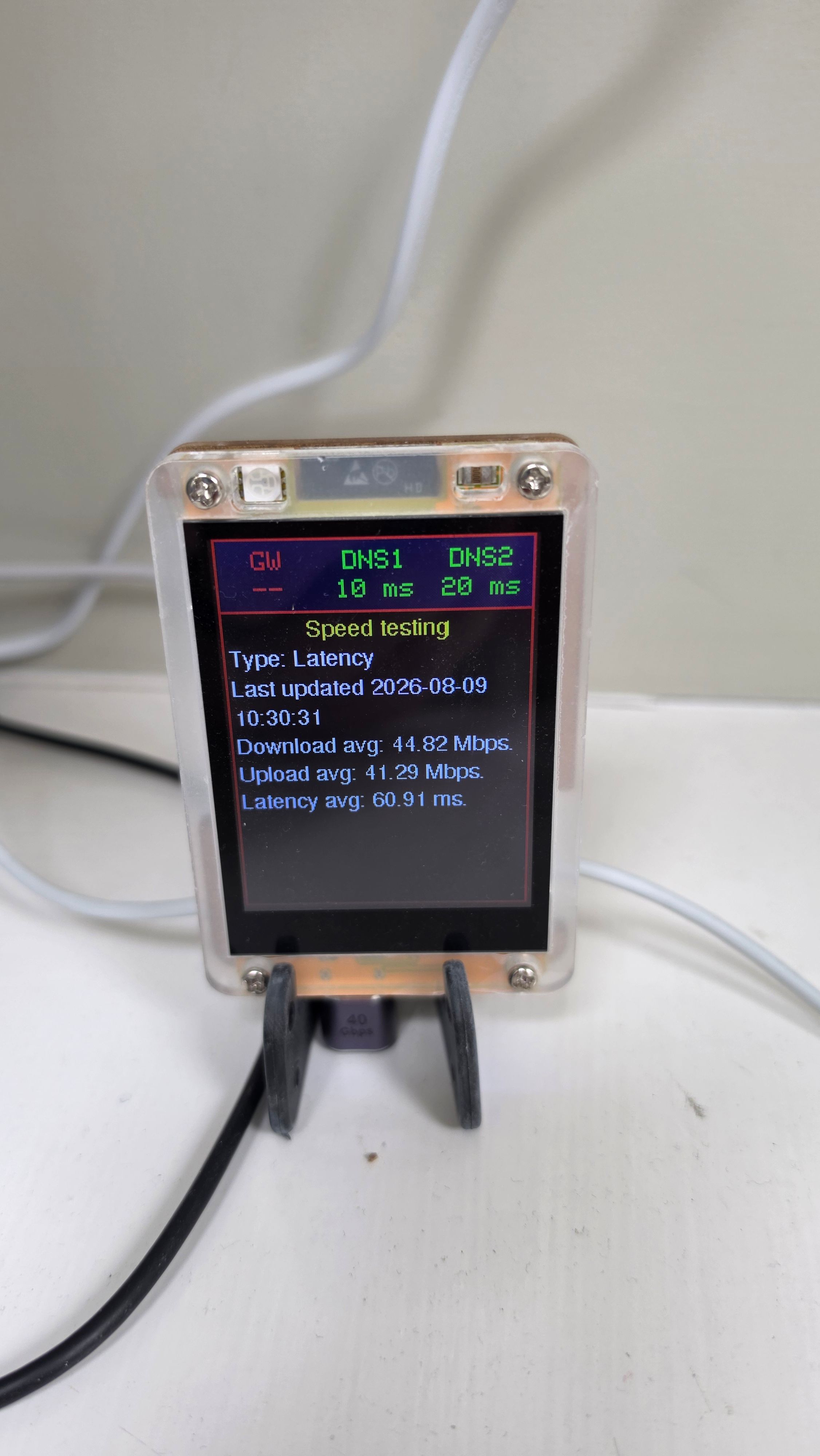
    Hi, I'm sorry for the long delay. We finally found the issue with why emails were not always being sent out by these forums. The display appears to be connected to the Internet correctly. We can tell because it is successfully reaching both DNS servers and has also received messages such as a completed a speed test showing about 44 Mbps download and 41 Mbps upload. The red gateway warning is most likely a false alarm caused by how the display checks the gateway. The display tries to make a connection to the gateway using a few common network services. The Eero or TP-Link gateway may simply not allow those particular connections, even though it is otherwise working perfectly. So this does not appear to mean the gateway or Internet connection is actually down. It is more likely that this particular network setup doesn't respond to the type of gateway test the display currently uses. We could adjust how the display performs that test so it handles networks like this correctly but I'm not sure how we would get an update to you and this device has already been discontinued for a much improved version. The display is working if you can live without it being able to determine your gateway. The important question is whether the Eero is in bridge mode or router mode. That determines whether the display sees the Eero or the TP-Link as its default gateway.
  • 0 Votes
    4 Posts
    252 Views
    ISPtracker_SupportI
    Does everything look ok now?
  • 1 Votes
    4 Posts
    450 Views
    ISPtracker_SupportI
    Ok well, I'll close this now. Thanks for contacting us so we could make it right.
  • Not Receiving SMS Alerts

    Solved service configure sms
    11
    1 Votes
    11 Posts
    766 Views
    K
    Thanks for the update and fix.
  • Unsure What to look for

    dashboard outages intermittent
    7
    0 Votes
    7 Posts
    2k Views
    ISPtracker_SupportI
    Hi, Is everything ok now? We're more than happy to help.
  • Yellow box not reporting

    Solved reporting information yellow box
    11
    1
    1 Votes
    11 Posts
    2k Views
    ISPtracker_SupportI
    Thank you.
  • SMS Credits Link Not Working

    Moved Solved payment service sms
    6
    0 Votes
    6 Posts
    867 Views
    ISPtracker_SupportI
    And thanks for taking the time to report that.
  • HW agents: one Abandoned, one fried and needs to be replaced

    Solved hw agent abandoned replacement
    29
    1 Votes
    29 Posts
    9k Views
    ISPtracker_SupportI
    For some reason, we've never seen this agent get back to us. I think the shipper sent it back.
  • Extended Purchase

    Solved keys setup purchase
    3
    1 Votes
    3 Posts
    1k Views
    ISPtracker_SupportI
    All ok now? Can we close this post?
  • Device hostname

    Solved hostname staticip dhcp
    6
    1 Votes
    6 Posts
    2k Views
    ISPtracker_SupportI
    The usual way is you let each device get an IP from the upstream DHCP server and as you see them, you note their MAC address and the agent ID. Then you can associate those together to know which agents are which.
  • Is my outage inside or out?

    internal vs ext cablemodem intermittent
    16
    1 Votes
    16 Posts
    3k Views
    L
    2026-02-27 11:25:10 - Down (142.254.184.109) for 1m 38s (Provider) 2026-02-27 10:53:14 - Down (142.254.184.109) for 8s (Provider) 2026-02-27 10:04:39 - Down (142.254.184.109) for 55s (Internal) 2026-02-27 09:44:39 - Down (142.254.184.109) for 2s (Internal) 2026-02-27 09:09:04 - Down (142.254.184.109) for 3s (Provider) 2026-02-27 08:00:44 - Down (142.254.184.109) for 6s (Provider)
  • Outages only happening after work hours

    Solved outage after hours traffic
    13
    1 Votes
    13 Posts
    4k Views
    ISPtracker_SupportI
    Ok, let us know if you need anything else. Thanks for using our service.
  • Agent notifying been inactive when it is not

    Solved notifications inactive communicating
    21
    1 Votes
    21 Posts
    7k Views
    I
    Yes, it can be closed, thanks
  • No emails received

    Solved notifications alerts email
    13
    1 Votes
    13 Posts
    3k Views
    ISPtracker_SupportI
    Is this solved now?
  • No Hops on 2 agents, but all other data shows

    no hops hardware agent dashboard
    15
    1 Votes
    15 Posts
    4k Views
    SBKS
    Any news on this?
  • email alerts suggestion

    alerts email outages
    14
    1 Votes
    14 Posts
    4k Views
    SBKS
    LOL All fine, and let me say that thanks to you we were able to identify an error, so please keep up sharing: we need feedback like this
  • New HW agent not connecting to network

    Unsolved agentnotworking agentsetup doa
    6
    0 Votes
    6 Posts
    2k Views
    ISPtracker_SupportI
    This has been done. SMS counts are now across however many agents someone has. Please let us know if this is all ok now and we'll close this question.
  • Agent disconected

    Solved agent disconnected agentnotworking
    11
    1 Votes
    11 Posts
    3k Views
    ISPtracker_SupportI
    The second problem was an SSL certificate that didn't get renewed in time. Automated things sometimes break when other companies change things. It's fixed too now.
  • Host monitoring history empty

    Unsolved host monitoring historical agent
    3
    1 Votes
    3 Posts
    1k Views
    SBKS
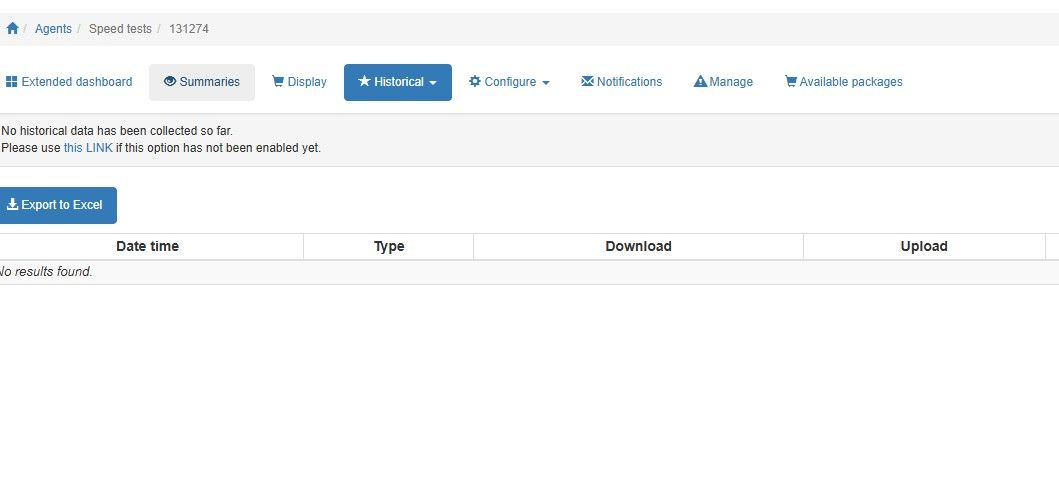
    Let me first ask if I am interpreting correctly your setup... For what I see you are asking the service to check every 15 minutes if the TCP port 65201 goes down and in the historical section you don't have any report. If my interpretation of the setup is correct then I confirm that no error has been found so far, i.e. port 65201 never went down from the moment you set it up.
  • email alerts

    Unsolved email alerts notifications
    6
    1 Votes
    6 Posts
    2k Views
    ISPtracker_SupportI
    After talking about it, we cannot take the chance of raising the number of emails because email sites will block us every time there is a huge outage with lots of emails being sent at the same time. This is why we limit the emails. That said, we've decided to re-design our SMS option so that all members can use that to receive notifications. Currently, only organizations that monitor dozens to thousands of locations get this by default so we have to review how we can do this for regular members. It will be announced as soon as it becomes available, possibly days to a week or so.