
Is my outage inside or out?
-
I was still redacting my answer and stumbled on the hops assignment...
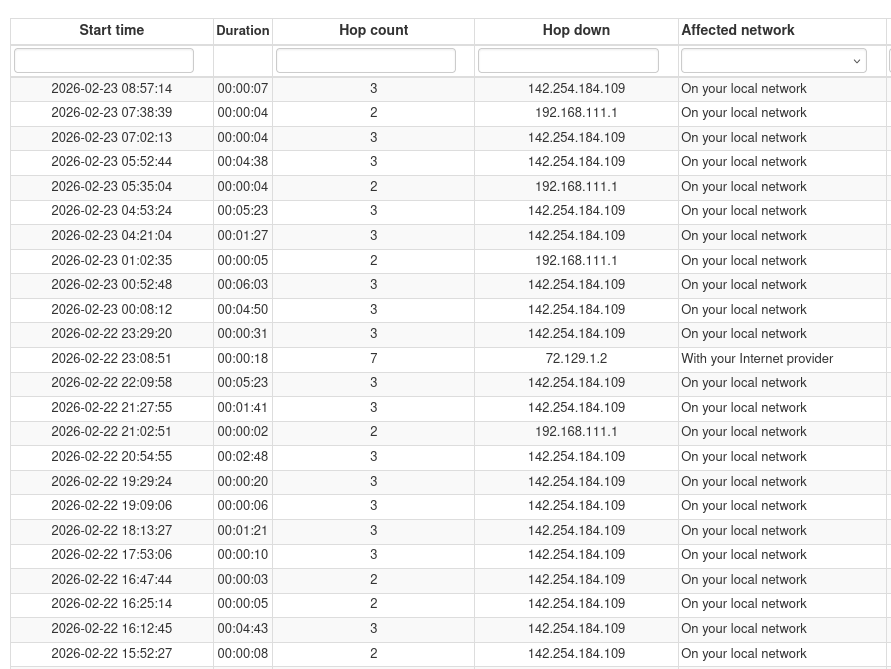
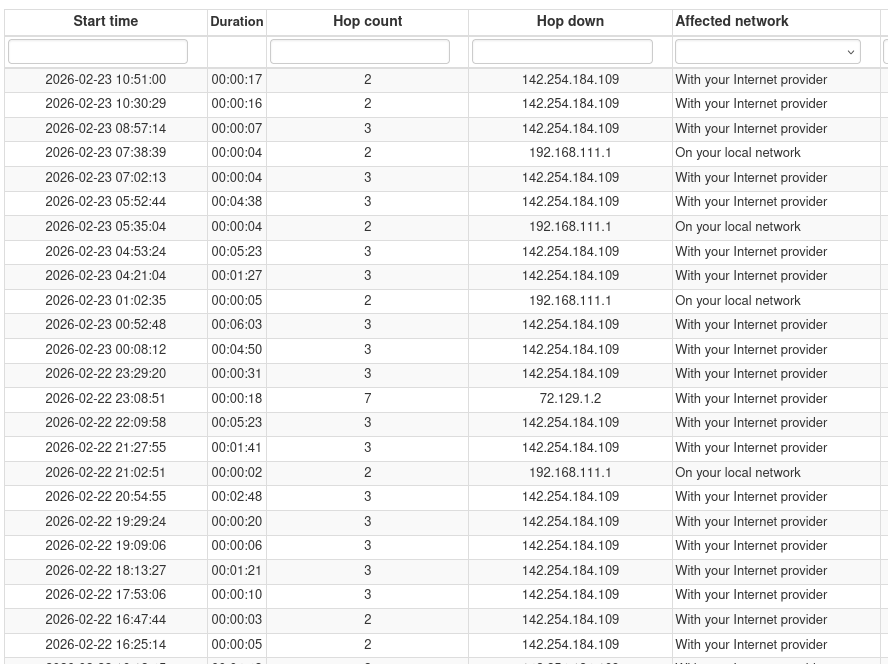
The above image shows the outages recorded at your site and you can see that both 192.168.111.1 and 142.254.184.109 are identified as triggering the outageMy question is are these two IP the LAN and the WAN interface of you ISP router ?
Or the private one is your router and the public one is the ISP?In any case, as I mentioned above the Affected network is wrong when the 142.254.184.109 is "responsible" of the outage
-
I am assuming that ID 129695 is the agent since your your traceroute is almost identical to the hops we have for it.
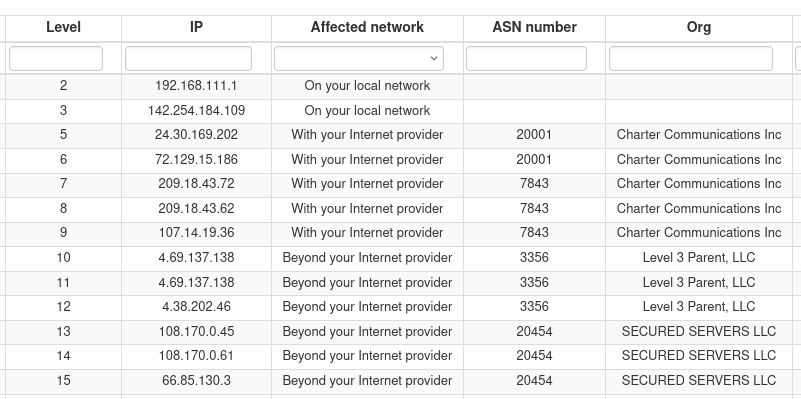
The weird thing is that for some reason the IP 142.254.184.109 has been considered part of your network while definitely it is not.
I am overriding that hop to be part of the ISP network to be sure that next outages will be associated correctly but at the same time I am opening an internal ticket to check why this has happened to your agentsaid in Is my outage inside or out?:
The weird thing is that for some reason the IP 142.254.184.109 has been considered part of your network while definitely it is not.
I am overriding that hop to be part of the ISP network to be sure that next outages will be associated correctly but at the same time I am opening an internal ticket to check why this has happened to your agentI also have an answer for this
If you take a look at the hops
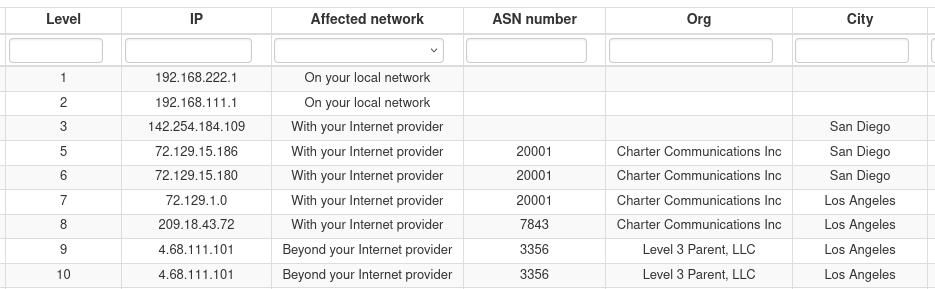
you will see that exactly THAT hop 142.254.184.109 has no ASN number/org this is something that can happen when portion of networks were before owned by a different provider (same could happen when the same company is assigned different ASN like 20001 and 7843 both belonging to Charter Communications)So thank you for highlighting this exception!
-
I was still redacting my answer and stumbled on the hops assignment...
The above image shows the outages recorded at your site and you can see that both 192.168.111.1 and 142.254.184.109 are identified as triggering the outageMy question is are these two IP the LAN and the WAN interface of you ISP router ?
Or the private one is your router and the public one is the ISP?In any case, as I mentioned above the Affected network is wrong when the 142.254.184.109 is "responsible" of the outage
@SBK said in Is my outage inside or out?:
The above image shows the outages recorded at your site and you can see that both 192.168.111.1 and 142.254.184.109 are identified as triggering the outage
My question is are these two IP the LAN and the WAN interface of you ISP router ?
Or the private one is your router and the public one is the ISP?So, ..222.1 is the inside of my router, ..111.1 is the inside of my cablemodem. 142.254.184.109 ("int-1.sndgcaxt03m.netops.charter.com") is, I believe, the first piece of equipment not on my prem; definitely not my cablemodem's outside IP.
-
FYI still sometimes showing their IP as internal:
2026-02-25 11:06:14 - Down (72.129.1.2) for 16s (Provider) 2026-02-25 08:45:14 - Down (142.254.184.109) for 7s (Internal) 2026-02-25 08:24:54 - Down (142.254.184.109) for 20s (Provider) 2026-02-25 06:49:09 - Down (142.254.184.109) for 21s (Provider) 2026-02-25 06:11:04 - Down (142.254.184.109) for 20s (Provider) -
2026-02-27 11:25:10 - Down (142.254.184.109) for 1m 38s (Provider)
2026-02-27 10:53:14 - Down (142.254.184.109) for 8s (Provider)
2026-02-27 10:04:39 - Down (142.254.184.109) for 55s (Internal)
2026-02-27 09:44:39 - Down (142.254.184.109) for 2s (Internal)
2026-02-27 09:09:04 - Down (142.254.184.109) for 3s (Provider)
2026-02-27 08:00:44 - Down (142.254.184.109) for 6s (Provider)
Hello! It looks like you're interested in this conversation, but you don't have an account yet.
Getting fed up of having to scroll through the same posts each visit? When you register for an account, you'll always come back to exactly where you were before, and choose to be notified of new replies (either via email, or push notification). You'll also be able to save bookmarks and upvote posts to show your appreciation to other community members.
With your input, this post could be even better 💗
Register Login