Skip to content

ISP Tracker features, agent or service questions

175 Topics 1.6k Posts

Ask how a feature works, how agents work, anything related to non specific agent platforms

Support forum notice: support.outagesio.com is now support.isptracker.com. Create a forum account and start a topic for ISP Tracker support.
Intelligent answers about Internet problems—without digging through raw data.
ISP Tracker explains what happened, where the problem appears, and whether it keeps happening. Learn more
  • Trying to reset 'Outages cumulative stats'

    reset counter cumulative
    6
    1 Votes
    6 Posts
    2k Views
    ISPtracker_SupportI
    I forgot but we do offer that. It's under manage and then reset. I've already done it for you and it should be completely clear of old data now. Can you confirm with me that everything is ok now once you look.
  • Hardware Agent Email Not Received

    hardware agent active email
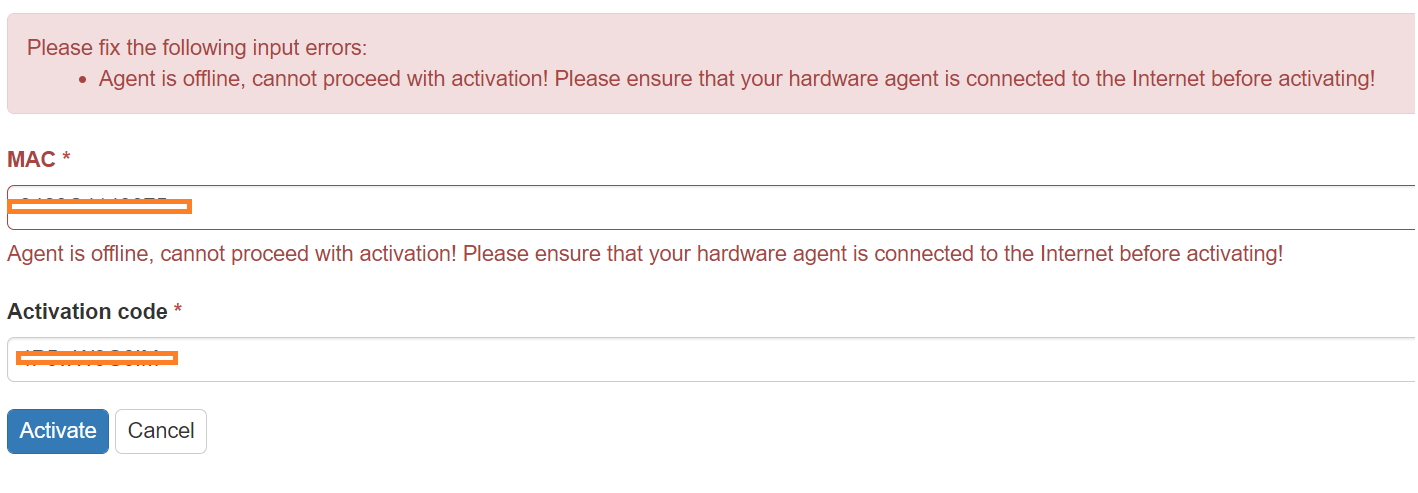
    2
    1 Votes
    2 Posts
    933 Views
    ISPtracker_SupportI
    Hi, We received the email at support as well and re-sent the activation email. We don't see a bounce so it must be in your spam box or it was blocked by your mail service. If that is the case, please be sure to whitelist the domains so that you don't miss out on any important emails while using the service. Hope you received it by the time this reply was sent :).
  • SOLVED: Hardware agent extended level

    hardware agent extended level active
    3
    0 Votes
    3 Posts
    1k Views
    SBKS
    @outagesio-greenwich-k12-ct-us I confirm it was a bug in the Activation process. It has been fixed! Thank you for letting us know.
  • Hardware/Software agent experience

    internet outages constant provider visionary
    26
    0 Votes
    26 Posts
    21k Views
    L
    @outagesio_support Yes, we played with enabling different DNS but it never really got "ideal". However after they redid all the connections, one of my "download" scripts became much better -- so I dunno. Our web connections/surfing were not particularly better until the VPN.
  • "Manage -> Reset" reset agent to non-paid version

    agent reset license
    3
    0 Votes
    3 Posts
    1k Views
    SBKS
    @outagesio-greenwich-k12-ct-us Hi, Definitely a bug introduced in a recent commit: thank you for highlighting. The fix has already been applied: please test it ASAP to confirm all is fine now.
  • Pre-release speed test fix

    1
    0 Votes
    1 Posts
    429 Views
    No one has replied
  • Reset agent option deleted entire agent!

    3
    0 Votes
    3 Posts
    738 Views
    ISPtracker_SupportI
    Hi, Thanks for taking the time to report this. I see that our dev reached out and took care of the problem over the weekend. If there is anything else you need, please feel free to ask here and we'll be happy to help. Thanks for using OutagesIO.
  • On your local network

    14
    0 Votes
    14 Posts
    4k Views
    A
    @outagesio_support Thanks, I'll tread lightly and give it a go. Will post how I get on. AF
  • problem beyond your internet provider

    2
    0 Votes
    2 Posts
    824 Views
    ISPtracker_SupportI
    @jjuly Hi, Yes, you definitely have some problems both with the provider and beyond. As you said, beyond are informational but it doesn't mean they cannot be used. I also notice that most of the problems are when you might be using the service especially if you work from home. Most are around the 10am to 3 pm and the next high is around 8pm If you have not been able to get them to fix the problems, that's one thing but if they have admitted they know and cannot fix it, that's another. Let's assume they aren't fixing the problems and you've reported it multiple times. I'll also make the assumption that they aren't taking your facts/findings seriously. In this sort of case, you should try to find one, two, more, neighbors that would be willing to install agents too. You can make the case that if you can show the proof you need, everyone will end up with better services. Some providers count on the fact that most people will simply suck it up and go away. They aren't going to make costly repairs unless there is something affecting their bottom line. However, if you can get others to join you, you can then show your correlated proof on their social pages. It's easy to dismiss one person but it's a whole lot harder when many people are complaining. If they remove your posts, you could always talk to the city, find someone to listen to you, show them what you have and see if someone higher up will help make a case for you. If most of the problems are with the providers upstream, you could try to reach them on social media as well. And of course, we'll be happy to help decipher the data to help you. In this day and age, as everything we do is being moved onto the Internet, there are no excuses for ongoing unreliable services.

  • Where do you dl the agent ?

    5
    0 Votes
    5 Posts
    1k Views
    ISPtracker_SupportI
    Hi, Can you try again please. There seemed to have been an issue with the sign up pages. You should be able to complete the sign up now.
  • Extended Service Purchase not shown/available on my agent

    4
    0 Votes
    4 Posts
    1k Views
    M
    Thank you!
  • New Startup Procedure

    2
    0 Votes
    2 Posts
    724 Views
    ISPtracker_SupportI
    Hi, Other than pings and information about the agent communicating, nothing will show up until there are actual events. Can you share the agent ID and I'll take a look to make sure everything looks ok.
  • Login redirects to Let Us Know

    8
    0 Votes
    8 Posts
    1k Views
    O
    Thanks again for your assistance. I tried a bunch of different combinations and I finally got it to work. It turns out my OCP profile had a missing last name. After I filled it in I passed the Let Us Know page and can now see the agent page. On the Update Account page, the last name field wasn't marked as required so I left it blank before, and I think that was causing the looping to occur.
  • How are speed tests calculated?

    6
    0 Votes
    6 Posts
    2k Views
    ISPtracker_SupportI
    Yes, most consumers just take it on the chin, it's less frustrating than fighting for what is right or what you are owed.
  • 0 Votes
    8 Posts
    2k Views
    O
    Yep, that was the agent in question, and it seems to be working now. Thank you for your help.
  • No Shipping Options to the Philippines?

    2
    0 Votes
    2 Posts
    912 Views
    ISPtracker_SupportI
    Hi, Perhaps it was yourself that asked about this via email and you were given the price of $40.00 which was a mistake. Asking the right person gave a price of $15.00 to the Phillipines. We don't have pricing for some countries because the shipping costs are sometimes too high and most people aren't interested. If you would like to order, please reply to the person that sent you that email and I'm sure they will work with you. Thank you for using OutagesIO.
  • Security scans settings not saving

    3
    0 Votes
    3 Posts
    1k Views
    ISPtracker_SupportI
    Hi, I asked the developers about tihs and the problem is the help/information doesn't show that the scan only runs from port 1 to 1024. We tested allowing a much larger range of ports and the problem was that when there are a large number of scans and ports, they take much too long to run. Also, most standard ports are under 1024. I have created a new issue to not only add this mention but also to see if there is anything else we might be able to to in order to raise that port limit.
  • Increased number of Internal disconnects

    11
    0 Votes
    11 Posts
    4k Views
    ISPtracker_SupportI
    NOTICE: I think a moderator accidentally edited your last comment instead of replying. To fix this, I am copying their reply into this new comment. It's good to hear that things have improved some. One issue we see regularly is that providers will make repairs, everything seems to work nicely for a while then slowly degrades again. This seems to be a common thread. However, I'm now 5 days in and have started to get Outage speed tests showing (Black bars on the graph) yet there is no outage shown on the outages graph or the "why my internet was down" list in light view. Can anyone tell me why this might be? This is a bug in the speed testing algorithm. There is a condition where the agent thinks there is a problem such as latency or a slow down which triggers these speed tests. The black bar is only supposed to show up after an outage. The idea behind running the speed test after an outage is that over time, it might show a trend. It's not all that useful since speeds are constantly changing and typically, right after an outage, speeds are way back up at least for a while. The reports are all about trends, it's what you see over longer periods of time but when you don't see an outage yet see the black bars, that's a bug we've been trying to iron out.
  • Agent has been abandoned

    2
    0 Votes
    2 Posts
    987 Views
    ISPtracker_SupportI
    Got an email with this subject. Agent number is not shown in my agents – I believe it refers to a software agent that I removed a long time ago. But not sure how to tell. Says it will be removed in 30 days. Yes, it would mean there is an old report being removed. I'll mention this to development because as you mention, you had deleted the agent, therefore, should not have received a notice about it. The notice is for those who have not deleted and may want to re-install it. Hardware agent has been installed and working except it didn't report an outage that we had (about 20 minutes) a few days ago There are many conditions which can cause loss of Internet access which aren't actually IP outages. Meaning, not all loss of Internet access are TCP/IP AKA routing based problems but other things. OutagesIO is built to mainly monitor IP outages with your provider but often, it's what you don't see that tells the story. If you don't see IP based outages (logged outages in your reports) but you do experience loss of Internet access or obviously low speeds, the first step is to check everything in your own location to make sure nothing is failing such as a cable, dust in Ethernet connectors, the most basic things. What OutagesIO cannot monitor are signal levels with cable and wireless providers/devices for example but when we're seeing loss of Internet access without outages, that's what is telling us that there are other problems to dig into or ask the provider about. One great method to use is to find some neighbors that might use the service too. This way, you can compare and correlate your reported loss of Internet access and other findings so that even mystery problems become more obvious. That said, we are working on another report that will show specifically non outage (IP) based loss of Internet access to help in exactly these situations.
  • How to reach the extended reports?

    7
    0 Votes
    7 Posts
    2k Views
    ISPtracker_SupportI
    The dev fixed the agent showing extended, but the reports are still not accessible. I was speaking with the dev a few minutes ago, he logged in using your account and could access all of the historical reports. Someone is reaching out to you now to see if they can help you personally as this seems to be escalating which is of no value to anyone. Uninstalling/re-installing will not lose the data has it would already be sent to your reports. The only time you can lose data is if there is an outage in progress and you restart the agent or re-install it, then it will lose that current report. I am now also having Agent Disconnected issues for no apparent reason. I reinstalled it once and it started working for a few hours, now it is down again and if I restart or reinstall I lose data. That is not a good start, to having just upgrade my service level. We have no issues finding out what the problem is, resolving it then restarting your extended from that point. Might be better if an innocuous statement that things aren't off to a good start is ignored and the issues addressed, instead of a defensive post that ignores the reported problem and tries to dress down the user! Nothing was meant that way. Your mention of not getting off to a good start implies that upgrading to a paid level suddenly broke everything for you yet we see a large amount of collected data from before you upgraded. When someone complains about the service, we take it very seriously. In this case, up until you purchased an extended upgrade for your reports, the agent collected a lof of data clearly showing that your connection is experiencing ongoing problems. Give us an opportunity to help you and please consider that text is never the same as face to face. As I said, someone has reached out to you. Please consider working with that person so that you and we can resolve what ever is going on. Thank you.