Skip to content
  • Categories
  • Recent
  • Tags
  • Popular
  • Users
  • Groups
Skins
  • Light
  • Brite
  • Cerulean
  • Cosmo
  • Flatly
  • Journal
  • Litera
  • Lumen
  • Lux
  • Materia
  • Minty
  • Morph
  • Pulse
  • Sandstone
  • Simplex
  • Sketchy
  • Spacelab
  • United
  • Yeti
  • Zephyr
  • Dark
  • Cyborg
  • Darkly
  • Quartz
  • Slate
  • Solar
  • Superhero
  • Vapor

  • Default (No Skin)
  • No Skin
Collapse
Monitor your Internet service and provider

Information and Support

  1. Home
  2. Categories
  3. Support forums
  4. Displays and Smart home devices. IoT, without invasive apps
  5. eero GW
Notice: support.outagesio.com is now consolidated into support.isptracker.com

Automatically monitor your Internet service and provider with alerts to problems
Track Internet disconnections, provider outages with historical data, and automated speed testing.
For Windows, Linux, ARM64, ARMa7. Learn more by visiting www.isptracker.com

If you have an account on app.isptracker.com, use the same credentials to log in here!

eero GW
Scheduled Pinned Locked Moved Unsolved Displays and Smart home devices. IoT, without invasive apps
gatewayconnnectiondisplay
20 Posts 2 Posters 381 Views 2 Watching
  • Oldest to Newest
  • Newest to Oldest
  • Most Votes
Reply
  • Reply as topic
Log in to reply
This topic has been deleted. Only users with topic management privileges can see it.
  • ISPtracker_SupportI Offline
    ISPtracker_SupportI Offline
    ISPtracker_Support
    wrote last edited by ISPtracker_Support
    #2

    Hi,

    From a PC/Laptop on the same network, can you run a traceroute to see what you get.
    Also, what is the agent ID so I can look that up please.

    Sorry for the delay. The site sometimes does not send us notifications of new posts.

    Regards,
    ISP Tracker Support

    Search engines favor deep pockets making it difficult to find services like ISP Tracker.
    We count on satisfied members spreading the word.

    1 Reply Last reply
    0
    • E Offline
      E Offline
      edmundo
      wrote last edited by
      #3

      Sorry, I was away.
      Tracing route to 192.168.4.1 over a maximum of 30 hops

      1 <1 ms <1 ms <1 ms 192.168.4.1

      Trace complete.
      How do I get the agent ID

      1 Reply Last reply
      0
      • E Offline
        E Offline
        edmundo
        wrote last edited by
        #4

        PS, I change back to a 192.168.4 network, but still no GW

        1 Reply Last reply
        0
        • ISPtracker_SupportI Offline
          ISPtracker_SupportI Offline
          ISPtracker_Support
          wrote last edited by ISPtracker_Support
          #5

          I'm not understanding what is happening. Your gateway is just that, the local gateway. It has to exist in order for packets to find their way out to the router/Internet.

          Your external provider would have nothing to do with that unless you are using the Internet directly connected into your providers router, no switches, nothing else, just connected direct. In that case, it's slightly possible that something weird is happening with your local router.

          Can you explain what you mean when you say you changed the IP?
          Also, your agent ID is the ID of the agent that is related to your display. You are running an agent, either hardware or software on your PC/Laptop that is doing the actual monitoring. The display is simply a way to see some of the results without having to log into your dashboard.
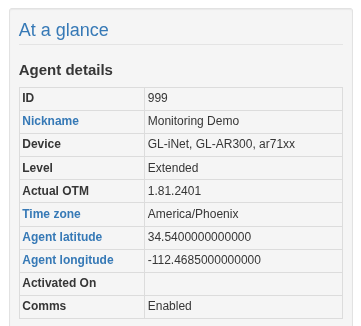
          Screenshot_20260321_081141.png

          Please log into app.isptracker.com and you'll see an ID number in the At a glance section of your dashboard. We just need to know the ID number, nothing else.

          Regards,
          ISP Tracker Support

          Search engines favor deep pockets making it difficult to find services like ISP Tracker.
          We count on satisfied members spreading the word.

          1 Reply Last reply
          0
          • ISPtracker_SupportI Offline
            ISPtracker_SupportI Offline
            ISPtracker_Support
            wrote last edited by
            #6

            I found your agent. These are the gateways you've had since you started monitoring.
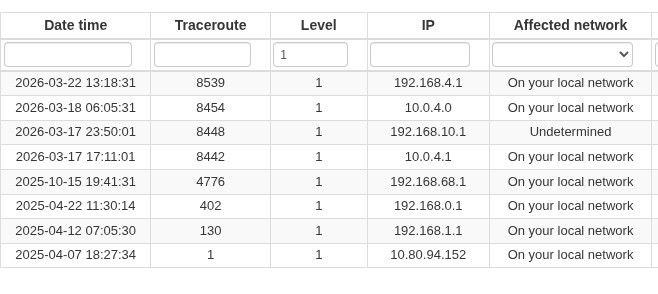
            519901bb-cc59-4a0a-bf5a-76b91889cb8c-image.jpeg

            Your agent ID is 131274. You can always see your full stats there. You should not depend on your display alone, that is just a summary of what your actual agent is seeing.

            Your LAN settings are as follows;
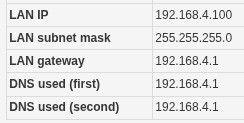
            b6bbbdd7-4d4e-442c-b000-d0b06d8ef421-image.jpeg

            So, as we can see, the gateway is there but the display cannot show it. After more research, I discovered the reason.

            Some routers don't certain ports that the display agent is looking for. The agent sees them but the display cannot as it has much more rudimentary discovery than the agent does. The display is not a monitoring tool itself, but it has some basic functions that allow it to tell you what's going on locally.

            I assume when you say you switch providers, you're talking about the hardware. What ever you're doijng when you 'switch', there is a change in the hardware that does not allow the display to do it's rudimentary test against your gateway. The hardware is not responding to the test the display is running so the display cannot show the status of the gw.

            That means, we'll have to test an update at our end and hopefully, send your display that update once we have it. We're stretched on time at the moment so I cannot promise when this will happen but we'll try to get it done in the near future. You might get a quicker surprise update but I just don't want to promise that.

            Hope this helps.

            Regards,
            ISP Tracker Support

            Search engines favor deep pockets making it difficult to find services like ISP Tracker.
            We count on satisfied members spreading the word.

            1 Reply Last reply
            0
            • E Offline
              E Offline
              edmundo
              wrote last edited by
              #7

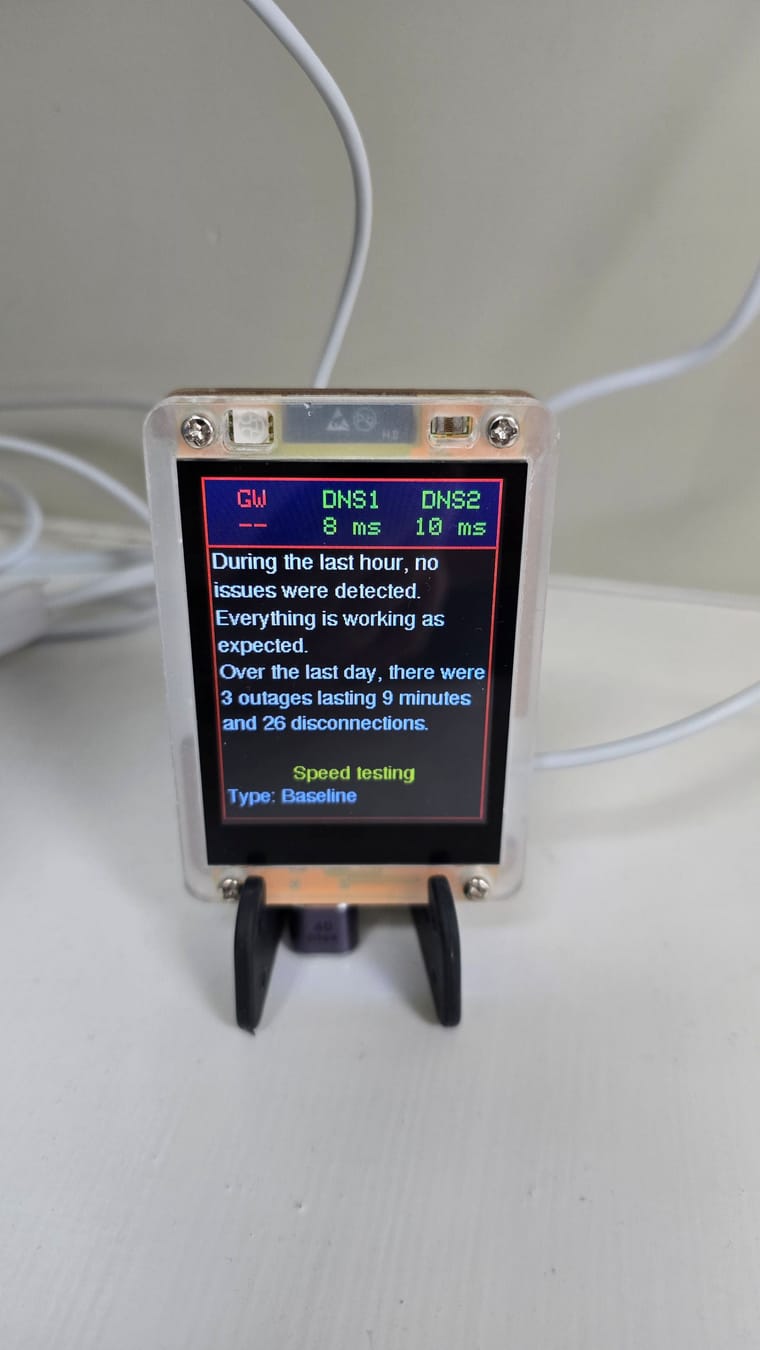
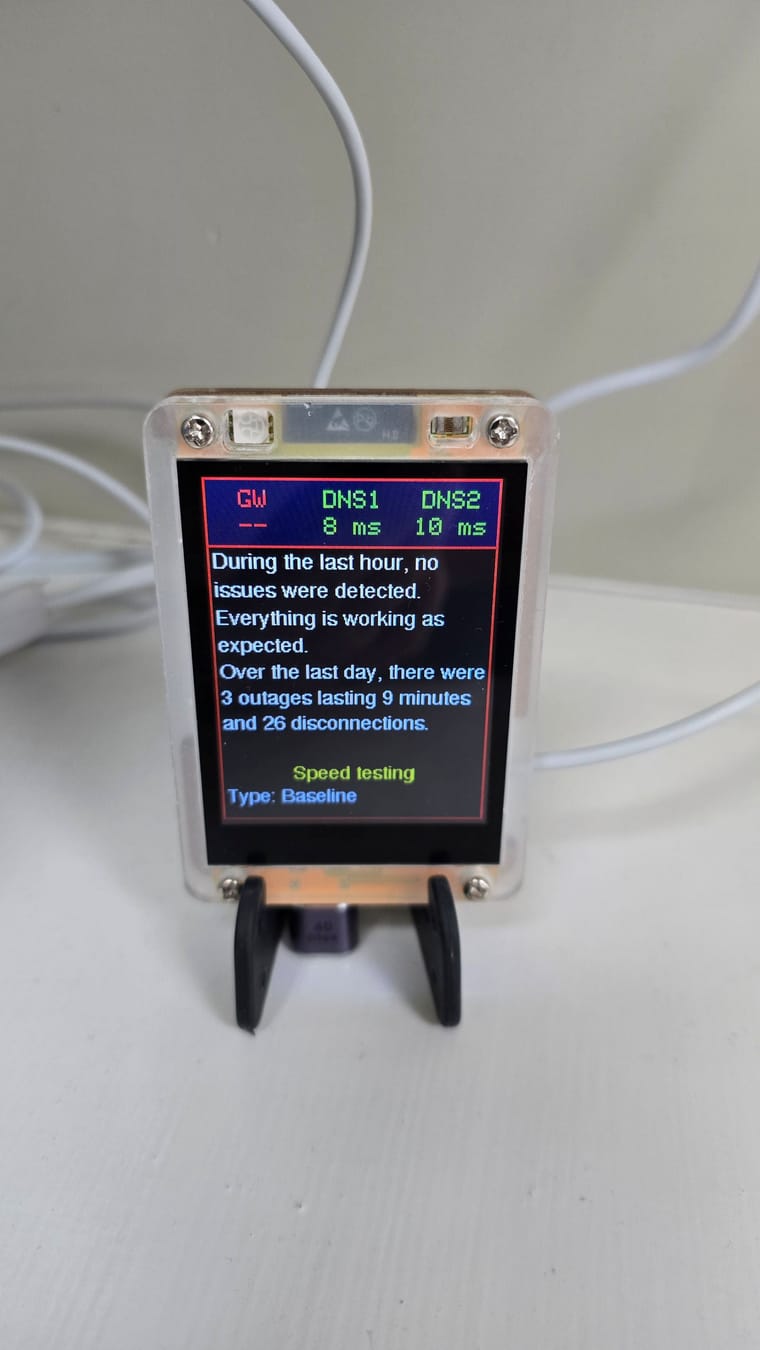
              Sorry, I think we are confusing agents. I have two agents, this one GL-iNet, MT300N-V2, ramips, which is fine. It is the display model that is not showing GW
              GW.jpg

              1 Reply Last reply
              0
              • E Offline
                E Offline
                edmundo
                wrote last edited by
                #8

                This is the problem agent ISP Tracker Mini Display. Thanks

                1 Reply Last reply
                0
                • E Offline
                  E Offline
                  edmundo
                  wrote last edited by
                  #9

                  Hi there, how are we getting on with this issue

                  1 Reply Last reply
                  0
                  • ISPtracker_SupportI Offline
                    ISPtracker_SupportI Offline
                    ISPtracker_Support
                    wrote last edited by
                    #10

                    If you have more than one, then I need to know the ID of the one that is related to this display.

                    Regards,
                    ISP Tracker Support

                    Search engines favor deep pockets making it difficult to find services like ISP Tracker.
                    We count on satisfied members spreading the word.

                    1 Reply Last reply
                    0
                    • E Offline
                      E Offline
                      edmundo
                      wrote last edited by
                      #11

                      Hi, there is only one display unit. I have asked how I can get the ID from it. You have the ID from the small yellow box!

                      1 Reply Last reply
                      0
                      • E Offline
                        E Offline
                        edmundo
                        wrote last edited by
                        #12

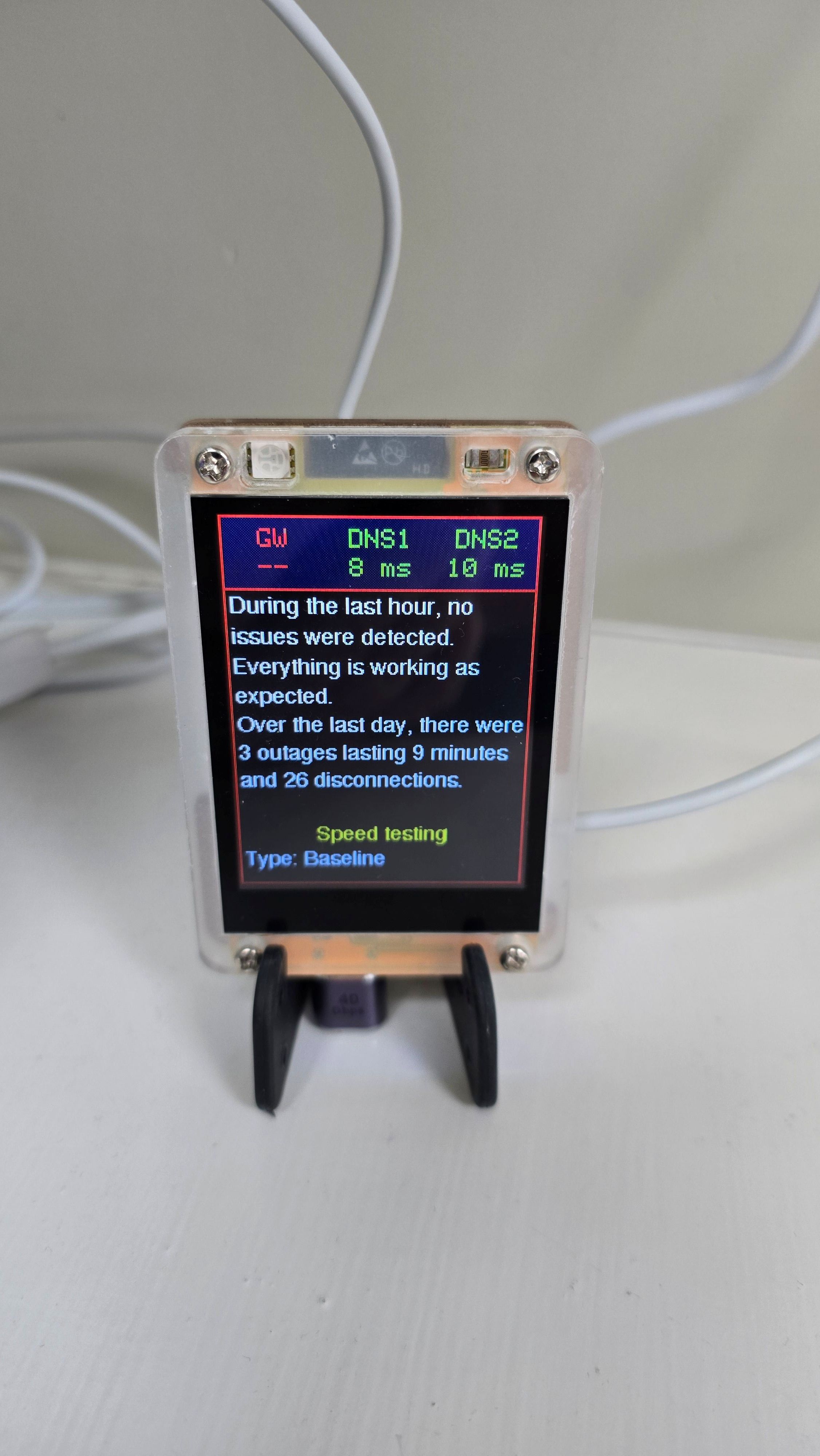
                        How do I get the ID for this? The one not showing the gateway
                        Display.jpg

                        1 Reply Last reply
                        0
                        • ISPtracker_SupportI Offline
                          ISPtracker_SupportI Offline
                          ISPtracker_Support
                          wrote last edited by
                          #13

                          We cannot help you until you tell me which agent this display is showing messages for.

                          Which two agents do you have? Each agent you have has a 6 digit ID code.
                          This display is not an agent, it simply displays short versions of what the agent monitors.

                          What agent is this display showing data for? Which agent ID is this display related to? When you bought this, you would have ordered from which ever agent you wanted this to work with.

                          Agents come in two versions, software that you run on your own PC/server and a physical one if you ordered one. Which agent is this display showing messages for?

                          Regards,
                          ISP Tracker Support

                          Search engines favor deep pockets making it difficult to find services like ISP Tracker.
                          We count on satisfied members spreading the word.

                          1 Reply Last reply
                          0
                          • E Offline
                            E Offline
                            edmundo
                            wrote last edited by
                            #14

                            Sorry about the misunderstanding, it's not the agent I have a problem with. It's the mini display in the picture that is not showing a gateway

                            1 Reply Last reply
                            0
                            • E Offline
                              E Offline
                              edmundo
                              wrote last edited by
                              #15

                              I thought this was a standalone unit. If this display is attached to an agent, how do I find it

                              1 Reply Last reply
                              0
                              • E Offline
                                E Offline
                                edmundo
                                wrote last edited by
                                #16

                                The only agent ID I have is 131274, which I thought was only attached to my yellow box. But you are saying this display is only showing me the information from the yellow box

                                1 Reply Last reply
                                0
                                • ISPtracker_SupportI Offline
                                  ISPtracker_SupportI Offline
                                  ISPtracker_Support
                                  wrote last edited by
                                  #17

                                  Yes, that is what I've been explaining :).

                                  The display is associated with an agent. It shows short versions of the information that your agent (131274) logs for you.

                                  The display alone is not an agent, it is only a display, meant to be used without needing a PC. Meaning, it's for convenience, you don't have to check your dashboard all the time, the display gives you notifications of what's going on.

                                  When you see something interesting, that's when you go to your dashboard to dig in deeper, if you're interested.

                                  As for why the GW is not showing, I gave some explanation of possible reason above.

                                  Regards,
                                  ISP Tracker Support

                                  Search engines favor deep pockets making it difficult to find services like ISP Tracker.
                                  We count on satisfied members spreading the word.

                                  1 Reply Last reply
                                  0
                                  • E Offline
                                    E Offline
                                    edmundo
                                    wrote last edited by
                                    #18

                                    Why didn't you just say that! 😂

                                    1 Reply Last reply
                                    0
                                    • ISPtracker_SupportI Offline
                                      ISPtracker_SupportI Offline
                                      ISPtracker_Support
                                      wrote last edited by
                                      #19

                                      I did but sometimes, text doesn't come across between two people :).
                                      Glad we are in sync now.

                                      Regards,
                                      ISP Tracker Support

                                      Search engines favor deep pockets making it difficult to find services like ISP Tracker.
                                      We count on satisfied members spreading the word.

                                      1 Reply Last reply
                                      0
                                      • E Offline
                                        E Offline
                                        edmundo
                                        wrote last edited by
                                        #20

                                        Thanks for all your help.

                                        1 Reply Last reply
                                        0
                                        • ISPtracker_SupportI ISPtracker_Support marked this topic as a question

                                        Hello! It looks like you're interested in this conversation, but you don't have an account yet.

                                        Getting fed up of having to scroll through the same posts each visit? When you register for an account, you'll always come back to exactly where you were before, and choose to be notified of new replies (either via email, or push notification). You'll also be able to save bookmarks and upvote posts to show your appreciation to other community members.

                                        With your input, this post could be even better 💗

                                        Register Login
                                        Reply
                                        • Reply as topic
                                        Log in to reply
                                        • Oldest to Newest
                                        • Newest to Oldest
                                        • Most Votes


                                        • Login

                                        • Don't have an account? Register

                                        • Login or register to search.
                                        • First post
                                          Last post
                                        0
                                        • Categories
                                        • Recent
                                        • Tags
                                        • Popular
                                        • Users
                                        • Groups