Skip to content
  • Home
  • Live
  • Categories
  • Recent
  • Tags
  • Popular
  • Groups
  • Login

  • Don't have an account? Register

  • Login or register to search.
Collapse
ISP Tracker ISP Tracker Live & Community
ISP Tracker Live Sign in
ISP Tracker Live & Community
  1. Home
  2. Categories
  3. Support forums
  4. ISP Tracker features, agent or service questions
  5. Is my outage inside or out?

Is my outage inside or out?

Scheduled Pinned Locked Moved ISP Tracker features, agent or service questions
internal vs extcablemodemintermittent
16 Posts 2 Posters 3.4k Views 2 Watching
  • Oldest to Newest
  • Newest to Oldest
  • Most Votes
Reply
  • Reply as topic
Log in to reply
This topic has been deleted. Only users with topic management privileges can see it.
  • L
    L
    lairdb
    wrote on last edited by
    #4

    Correct.

    1 Reply Last reply
    0
    • SBKS
      SBKS
      SBK
      wrote on last edited by
      #5

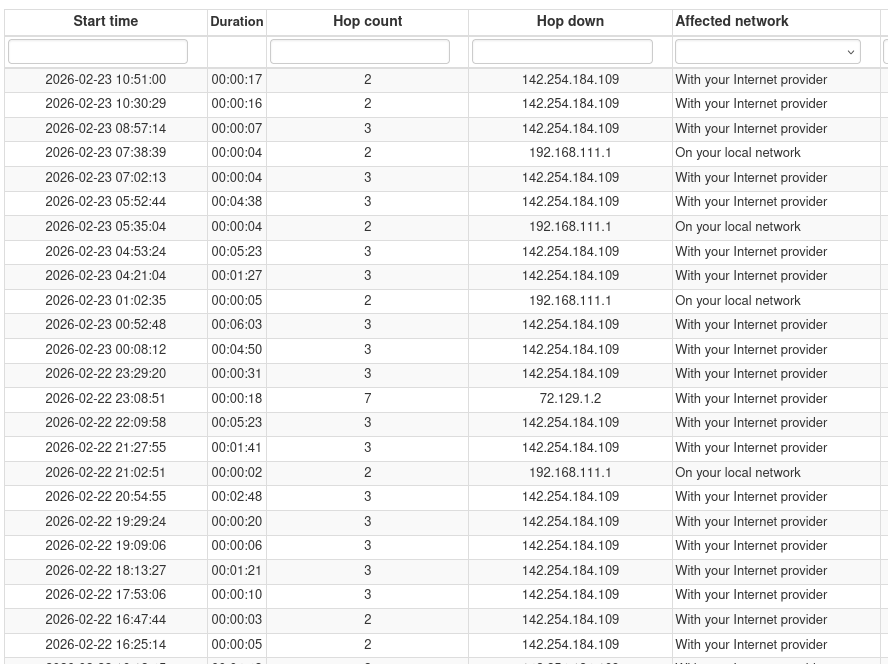
      I am assuming that ID 129695 is the agent since your your traceroute is almost identical to the hops we have for it.
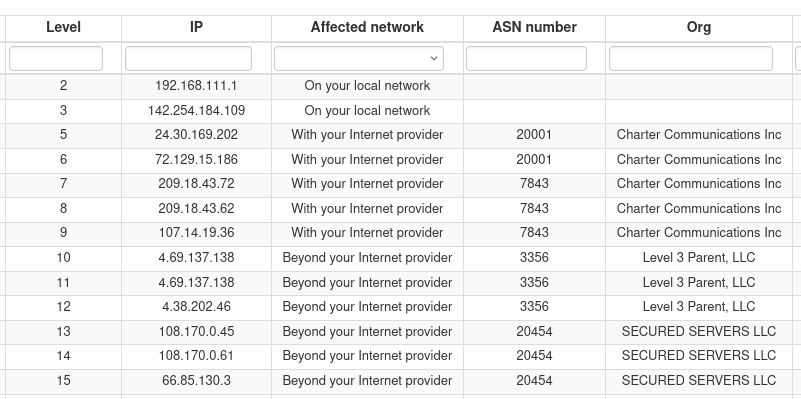
      image.png

      The weird thing is that for some reason the IP 142.254.184.109 has been considered part of your network while definitely it is not.
      I am overriding that hop to be part of the ISP network to be sure that next outages will be associated correctly but at the same time I am opening an internal ticket to check why this has happened to your agent

      Ed (K.)
      Development Team

      SBKS 1 Reply Last reply
      0
      • L
        L
        lairdb
        wrote on last edited by
        #6

        Thanks -- but what interpretation should I put on this? Is my issue with the cablemodem ..111.1 or with the Charter device 142.254.184.109 (or the link between?)

        1 Reply Last reply
        0
        • SBKS
          SBKS
          SBK
          wrote on last edited by SBK
          #7

          I was still redacting my answer and stumbled on the hops assignment...
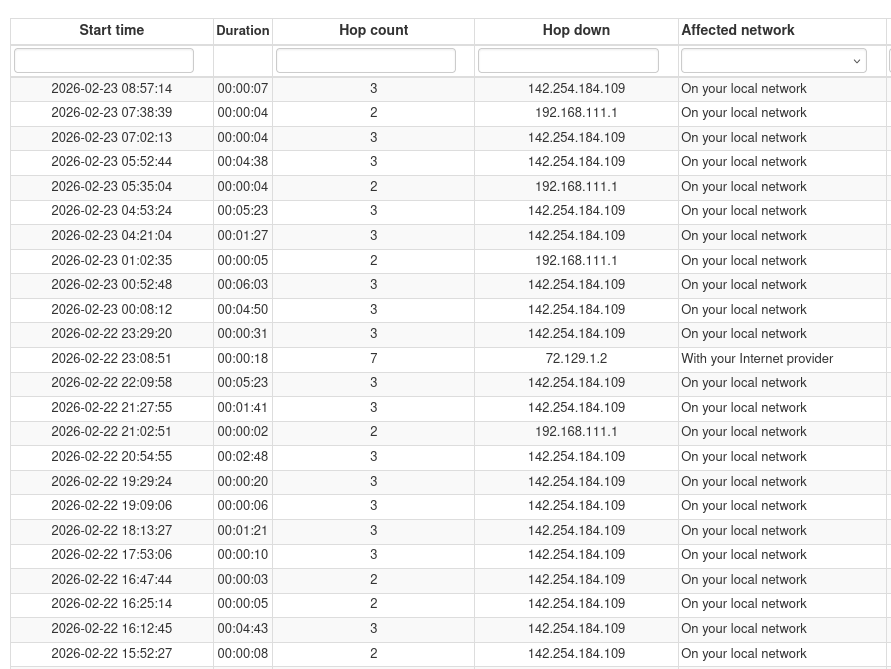
          image.png
          The above image shows the outages recorded at your site and you can see that both 192.168.111.1 and 142.254.184.109 are identified as triggering the outage

          My question is are these two IP the LAN and the WAN interface of you ISP router ?
          Or the private one is your router and the public one is the ISP?

          In any case, as I mentioned above the Affected network is wrong when the 142.254.184.109 is "responsible" of the outage

          Ed (K.)
          Development Team

          L 1 Reply Last reply
          0
          • SBKS
            SBKS
            SBK
            wrote on last edited by
            #8

            Now it seems better, as far as I can see

            image.png

            Ed (K.)
            Development Team

            1 Reply Last reply
            0
            • SBKS SBK

              I am assuming that ID 129695 is the agent since your your traceroute is almost identical to the hops we have for it.

              image.png

              The weird thing is that for some reason the IP 142.254.184.109 has been considered part of your network while definitely it is not.
              I am overriding that hop to be part of the ISP network to be sure that next outages will be associated correctly but at the same time I am opening an internal ticket to check why this has happened to your agent

              SBKS
              SBKS
              SBK
              wrote on last edited by SBK
              #9

              said in Is my outage inside or out?:

              The weird thing is that for some reason the IP 142.254.184.109 has been considered part of your network while definitely it is not.
              I am overriding that hop to be part of the ISP network to be sure that next outages will be associated correctly but at the same time I am opening an internal ticket to check why this has happened to your agent

              I also have an answer for this

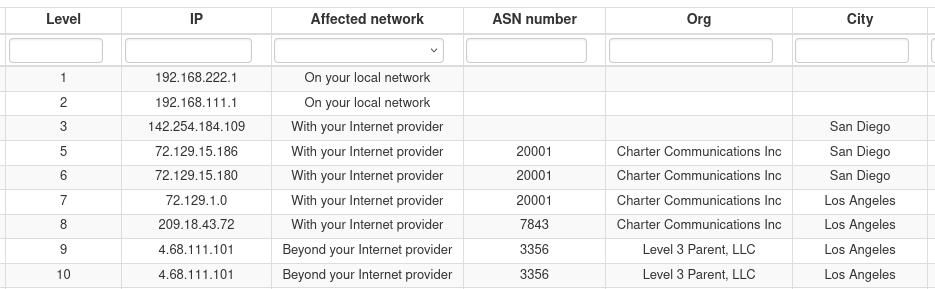
              If you take a look at the hops
              d389a460-b799-48f8-8956-ddd5a9758c8b-image.png
              you will see that exactly THAT hop 142.254.184.109 has no ASN number/org this is something that can happen when portion of networks were before owned by a different provider (same could happen when the same company is assigned different ASN like 20001 and 7843 both belonging to Charter Communications)

              So thank you for highlighting this exception!

              Ed (K.)
              Development Team

              1 Reply Last reply
              0
              • SBKS SBK

                I was still redacting my answer and stumbled on the hops assignment...

                image.png
                The above image shows the outages recorded at your site and you can see that both 192.168.111.1 and 142.254.184.109 are identified as triggering the outage

                My question is are these two IP the LAN and the WAN interface of you ISP router ?
                Or the private one is your router and the public one is the ISP?

                In any case, as I mentioned above the Affected network is wrong when the 142.254.184.109 is "responsible" of the outage

                L
                L
                lairdb
                wrote on last edited by
                #10

                @SBK said in Is my outage inside or out?:

                The above image shows the outages recorded at your site and you can see that both 192.168.111.1 and 142.254.184.109 are identified as triggering the outage

                My question is are these two IP the LAN and the WAN interface of you ISP router ?
                Or the private one is your router and the public one is the ISP?

                So, ..222.1 is the inside of my router, ..111.1 is the inside of my cablemodem. 142.254.184.109 ("int-1.sndgcaxt03m.netops.charter.com") is, I believe, the first piece of equipment not on my prem; definitely not my cablemodem's outside IP.

                1 Reply Last reply
                0
                • SBKS
                  SBKS
                  SBK
                  wrote on last edited by
                  #11

                  Then the first ISP hop is and must be 142.254.184.109 which is how it shows up now

                  Ed (K.)
                  Development Team

                  1 Reply Last reply
                  0
                  • L
                    L
                    lairdb
                    wrote on last edited by
                    #12

                    FYI still sometimes showing their IP as internal:

                    2026-02-25 11:06:14 - Down (72.129.1.2) for 16s (Provider)
                    2026-02-25 08:45:14 - Down (142.254.184.109) for 7s (Internal)
                    2026-02-25 08:24:54 - Down (142.254.184.109) for 20s (Provider)
                    2026-02-25 06:49:09 - Down (142.254.184.109) for 21s (Provider)
                    2026-02-25 06:11:04 - Down (142.254.184.109) for 20s (Provider)
                    
                    1 Reply Last reply
                    0
                    • SBKS
                      SBKS
                      SBK
                      wrote on last edited by
                      #13

                      I was testing an exception
                      Sorry for not informing!
                      It has been fixed now
                      Please confirm

                      Ed (K.)
                      Development Team

                      L 1 Reply Last reply
                      0
                      • SBKS SBK

                        I was testing an exception
                        Sorry for not informing!
                        It has been fixed now
                        Please confirm

                        L
                        L
                        lairdb
                        wrote on last edited by
                        #14

                        @SBK said in Is my outage inside or out?:

                        I was testing an exception
                        Sorry for not informing!
                        It has been fixed now
                        Please confirm

                        Yes; thanks.

                        1 Reply Last reply
                        0
                        • SBKS
                          SBKS
                          SBK
                          wrote on last edited by
                          #15

                          Keep us posted if you see something else that sounds "weird"

                          Ed (K.)
                          Development Team

                          1 Reply Last reply
                          0
                          • L
                            L
                            lairdb
                            wrote on last edited by
                            #16

                            2026-02-27 11:25:10 - Down (142.254.184.109) for 1m 38s (Provider)
                            2026-02-27 10:53:14 - Down (142.254.184.109) for 8s (Provider)
                            2026-02-27 10:04:39 - Down (142.254.184.109) for 55s (Internal)
                            2026-02-27 09:44:39 - Down (142.254.184.109) for 2s (Internal)
                            2026-02-27 09:09:04 - Down (142.254.184.109) for 3s (Provider)
                            2026-02-27 08:00:44 - Down (142.254.184.109) for 6s (Provider)
                            1 Reply Last reply
                            0

                            Hello! It looks like you're interested in this conversation, but you don't have an account yet.

                            Getting fed up of having to scroll through the same posts each visit? When you register for an account, you'll always come back to exactly where you were before, and choose to be notified of new replies (either via email, or push notification). You'll also be able to save bookmarks and upvote posts to show your appreciation to other community members.

                            With your input, this post could be even better đź’—

                            Register Login

                            While you’re away

                            Your Internet does not wait until you’re watching.

                            ISP Tracker keeps a history of problems that happen overnight or while you’re away.

                            Between speed tests

                            What happened between speed tests?

                            See how your connection behaves over time—not just when you remember to test it.

                            Wider context

                            Is it only your connection?

                            Similar activity across monitored locations can provide valuable wider context.

                            • First post
                              Last post
                            0
                            • Home
                            • Live
                            • Categories
                            • Recent
                            • Tags
                            • Popular
                            • Groups