Skip to content
  • Categories
  • Recent
  • Tags
  • Popular
  • Users
  • Groups
Skins
  • Light
  • Brite
  • Cerulean
  • Cosmo
  • Flatly
  • Journal
  • Litera
  • Lumen
  • Lux
  • Materia
  • Minty
  • Morph
  • Pulse
  • Sandstone
  • Simplex
  • Sketchy
  • Spacelab
  • United
  • Yeti
  • Zephyr
  • Dark
  • Cyborg
  • Darkly
  • Quartz
  • Slate
  • Solar
  • Superhero
  • Vapor

  • Default (No Skin)
  • No Skin
Collapse
Monitor your Internet service and provider

Information and Support

  1. Home
  2. Categories
  3. Support forums
  4. ISP Tracker features, agent or service questions
  5. Is my outage inside or out?
Notice: support.outagesio.com is now consolidated into support.isptracker.com

Automatically monitor your Internet service and provider with alerts to problems
Track Internet disconnections, provider outages with historical data, and automated speed testing.
For Windows, Linux, ARM64, ARMa7. Learn more by visiting www.isptracker.com
Notice: If you created an account on app.isptracker.com, simply use the same credentials to log into these support forums.

Is my outage inside or out?

Scheduled Pinned Locked Moved ISP Tracker features, agent or service questions
internal vs extcablemodemintermittent
16 Posts 2 Posters 376 Views 2 Watching
  • Oldest to Newest
  • Newest to Oldest
  • Most Votes
Reply
  • Reply as topic
Log in to reply
This topic has been deleted. Only users with topic management privileges can see it.
  • SBKS Offline
    SBKS Offline
    SBK
    wrote last edited by
    #5

    I am assuming that ID 129695 is the agent since your your traceroute is almost identical to the hops we have for it.
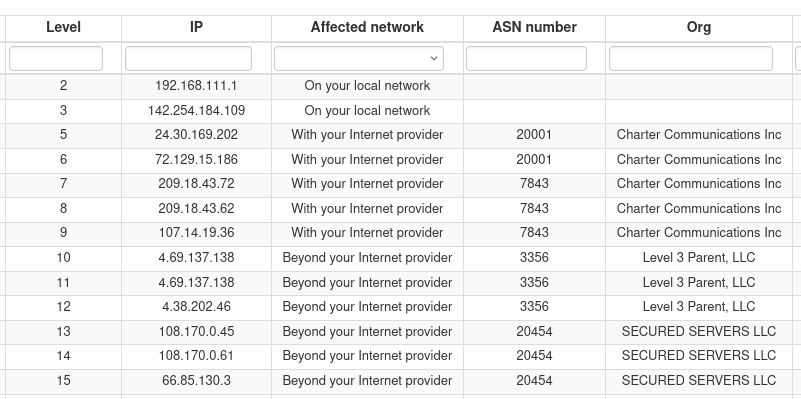
    image.png

    The weird thing is that for some reason the IP 142.254.184.109 has been considered part of your network while definitely it is not.
    I am overriding that hop to be part of the ISP network to be sure that next outages will be associated correctly but at the same time I am opening an internal ticket to check why this has happened to your agent

    Ed (K.)
    Development Team

    SBKS 1 Reply Last reply
    0
    • L Offline
      L Offline
      lairdb
      wrote last edited by
      #6

      Thanks -- but what interpretation should I put on this? Is my issue with the cablemodem ..111.1 or with the Charter device 142.254.184.109 (or the link between?)

      1 Reply Last reply
      0
      • SBKS Offline
        SBKS Offline
        SBK
        wrote last edited by SBK
        #7

        I was still redacting my answer and stumbled on the hops assignment...
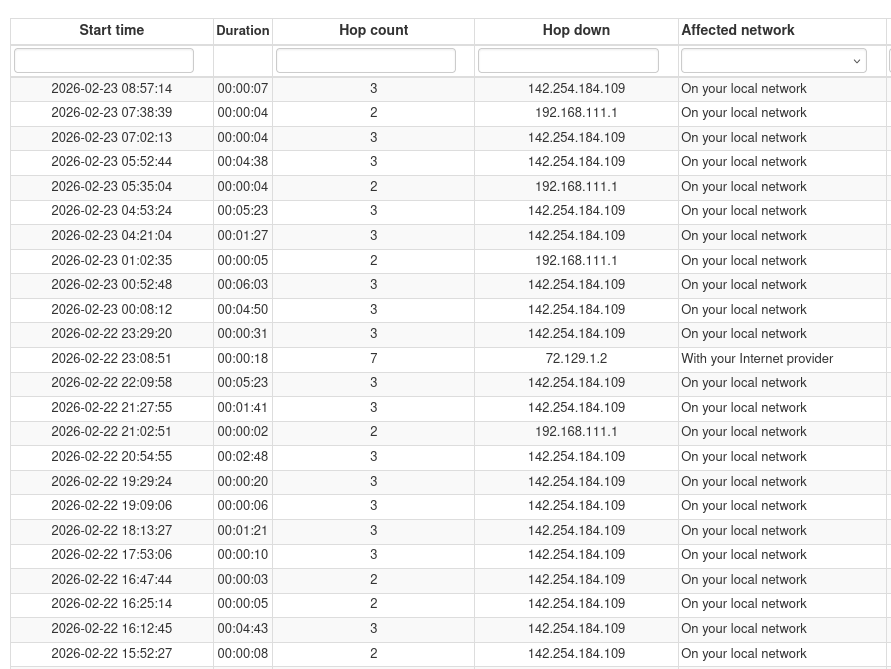
        image.png
        The above image shows the outages recorded at your site and you can see that both 192.168.111.1 and 142.254.184.109 are identified as triggering the outage

        My question is are these two IP the LAN and the WAN interface of you ISP router ?
        Or the private one is your router and the public one is the ISP?

        In any case, as I mentioned above the Affected network is wrong when the 142.254.184.109 is "responsible" of the outage

        Ed (K.)
        Development Team

        L 1 Reply Last reply
        0
        • SBKS Offline
          SBKS Offline
          SBK
          wrote last edited by
          #8

          Now it seems better, as far as I can see

          image.png

          Ed (K.)
          Development Team

          1 Reply Last reply
          0
          • SBKS SBK

            I am assuming that ID 129695 is the agent since your your traceroute is almost identical to the hops we have for it.

            image.png

            The weird thing is that for some reason the IP 142.254.184.109 has been considered part of your network while definitely it is not.
            I am overriding that hop to be part of the ISP network to be sure that next outages will be associated correctly but at the same time I am opening an internal ticket to check why this has happened to your agent

            SBKS Offline
            SBKS Offline
            SBK
            wrote last edited by SBK
            #9

            said in Is my outage inside or out?:

            The weird thing is that for some reason the IP 142.254.184.109 has been considered part of your network while definitely it is not.
            I am overriding that hop to be part of the ISP network to be sure that next outages will be associated correctly but at the same time I am opening an internal ticket to check why this has happened to your agent

            I also have an answer for this

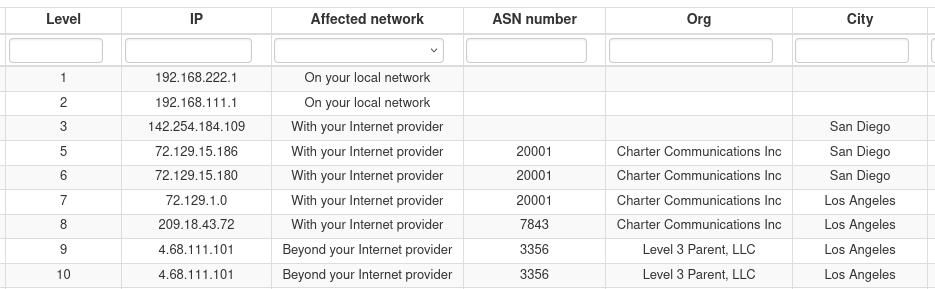
            If you take a look at the hops
            d389a460-b799-48f8-8956-ddd5a9758c8b-image.png
            you will see that exactly THAT hop 142.254.184.109 has no ASN number/org this is something that can happen when portion of networks were before owned by a different provider (same could happen when the same company is assigned different ASN like 20001 and 7843 both belonging to Charter Communications)

            So thank you for highlighting this exception!

            Ed (K.)
            Development Team

            1 Reply Last reply
            0
            • SBKS SBK

              I was still redacting my answer and stumbled on the hops assignment...

              image.png
              The above image shows the outages recorded at your site and you can see that both 192.168.111.1 and 142.254.184.109 are identified as triggering the outage

              My question is are these two IP the LAN and the WAN interface of you ISP router ?
              Or the private one is your router and the public one is the ISP?

              In any case, as I mentioned above the Affected network is wrong when the 142.254.184.109 is "responsible" of the outage

              L Offline
              L Offline
              lairdb
              wrote last edited by
              #10

              @SBK said in Is my outage inside or out?:

              The above image shows the outages recorded at your site and you can see that both 192.168.111.1 and 142.254.184.109 are identified as triggering the outage

              My question is are these two IP the LAN and the WAN interface of you ISP router ?
              Or the private one is your router and the public one is the ISP?

              So, ..222.1 is the inside of my router, ..111.1 is the inside of my cablemodem. 142.254.184.109 ("int-1.sndgcaxt03m.netops.charter.com") is, I believe, the first piece of equipment not on my prem; definitely not my cablemodem's outside IP.

              1 Reply Last reply
              0
              • SBKS Offline
                SBKS Offline
                SBK
                wrote last edited by
                #11

                Then the first ISP hop is and must be 142.254.184.109 which is how it shows up now

                Ed (K.)
                Development Team

                1 Reply Last reply
                0
                • L Offline
                  L Offline
                  lairdb
                  wrote last edited by
                  #12

                  FYI still sometimes showing their IP as internal:

                  2026-02-25 11:06:14 - Down (72.129.1.2) for 16s (Provider)
                  2026-02-25 08:45:14 - Down (142.254.184.109) for 7s (Internal)
                  2026-02-25 08:24:54 - Down (142.254.184.109) for 20s (Provider)
                  2026-02-25 06:49:09 - Down (142.254.184.109) for 21s (Provider)
                  2026-02-25 06:11:04 - Down (142.254.184.109) for 20s (Provider)
                  
                  1 Reply Last reply
                  0
                  • SBKS Offline
                    SBKS Offline
                    SBK
                    wrote last edited by
                    #13

                    I was testing an exception
                    Sorry for not informing!
                    It has been fixed now
                    Please confirm

                    Ed (K.)
                    Development Team

                    L 1 Reply Last reply
                    0
                    • SBKS SBK

                      I was testing an exception
                      Sorry for not informing!
                      It has been fixed now
                      Please confirm

                      L Offline
                      L Offline
                      lairdb
                      wrote last edited by
                      #14

                      @SBK said in Is my outage inside or out?:

                      I was testing an exception
                      Sorry for not informing!
                      It has been fixed now
                      Please confirm

                      Yes; thanks.

                      1 Reply Last reply
                      0
                      • SBKS Offline
                        SBKS Offline
                        SBK
                        wrote last edited by
                        #15

                        Keep us posted if you see something else that sounds "weird"

                        Ed (K.)
                        Development Team

                        1 Reply Last reply
                        0
                        • L Offline
                          L Offline
                          lairdb
                          wrote last edited by
                          #16

                          2026-02-27 11:25:10 - Down (142.254.184.109) for 1m 38s (Provider)
                          2026-02-27 10:53:14 - Down (142.254.184.109) for 8s (Provider)
                          2026-02-27 10:04:39 - Down (142.254.184.109) for 55s (Internal)
                          2026-02-27 09:44:39 - Down (142.254.184.109) for 2s (Internal)
                          2026-02-27 09:09:04 - Down (142.254.184.109) for 3s (Provider)
                          2026-02-27 08:00:44 - Down (142.254.184.109) for 6s (Provider)
                          1 Reply Last reply
                          0
                          Reply
                          • Reply as topic
                          Log in to reply
                          • Oldest to Newest
                          • Newest to Oldest
                          • Most Votes


                          • Login

                          • Don't have an account? Register

                          • Login or register to search.
                          • First post
                            Last post
                          0
                          • Categories
                          • Recent
                          • Tags
                          • Popular
                          • Users
                          • Groups