
Automatically monitor your Internet service and provider with alerts to problems
Track Internet disconnections, provider outages with historical data, and automated speed testing.
For Windows, Linux, ARM64, ARMa7. Learn more by visiting www.isptracker.com
If you have an account on app.isptracker.com, use the same credentials to log in here!
New Display
-
Hi,
The flashing is related to one of three things.
Slowdowns, local gateway becoming unresponsive or unreachable and ISP down. This is just a local, basic monitoring that the mini display does.Your agent is monitoring everything and the mini display agent is meant to most of those those events.
The timings could be changed or fine tuned but it would have to be with more input because it would affect all mini displays.
The best thing would be to keep it as it is because it's mainly an early warning method of knowing if there are some connectivity issues locally.
If you take a look at the help page (Display) in your dashboard, the timings should be explained there.
Let us know your thoughts after taking a look please.
-
Here are the details about the flashing.
How often it checks and when it changes
The display tests your connection roughly every 5 seconds.
If your router or both DNS checks stop responding on these tests, the border turns red and blinks.
If everything responds but the numbers in the top bar rise above about 150 ms, the display treats that as slower than normal and may show a yellow, blinking border.
If numbers climb past about 300 ms, the top bar values turn orange and the border keeps blinking until things speed up again.
When several checks in a row look normal again, the border returns to a solid green state.
If Wi-Fi looks fine but the display cannot talk to your ISP Tracker service for around 15 seconds, it will also show a red, blinking border until contact is restored.
If I may ask, what is it about the flashing that you do not like since the point of the device is to give you a visual of what's happening with the connection.
-
Hi,
Can you give us a little more feedback so we can come up with some ideas that might work. The whole point of the flashing is to get attention to potential problems or to simply know what's going on.
If your display is flashing a lot, it also means there may be some potential problems on your local network.
Maybe we need to give some kind of controls to the display owners that allow them to change those settings.
My concern with that would be that when we give too many controls, some non technical users sometimes get into trouble adjusting things in the wrong way, causing problems. That sometimes leads to them blaming the service for not working when it's really just their settings.
-
Hi,
Still waiting for some input from you so that we can look at this. We're not really sure which flashing you're speaking of at the moment so really don't know how to help without more feedback please.
-
Hi,
I had the display in my direct sight, and I was watching a streaming channel. The unit was flashing yellow and green, but my Netflix viewing was fine. I have moved the display to my right-hand side, and it's fine. I understand that streaming channels may buffer their content, so I was not affected; however, this is probably more important when gaming. Is the information taken from the ISP Tracker I have plugged in? So the information on the display matches the website.
-
Thanks for the input.
The flashing is not related to the agent. The display has its own basic monitoring built in to show what's going on in real time.
For example, if there is an IP outage (not inactive or disconnected), the border will flash red.
The display does not know if it's the ISP or your local network but if there was an IP outage, your agent will catch that and send the result to the display.
So it's kind of a double detection thing that's going on. The display does get a version of any alerts you'd get in the app but it also has its own local basic monitoring.
It's possible that it might be too sensitive. The timings are shown in the help page under Display. We're looking at how we might be able to give users controls but also concerned as I mentioned above that users might not set that right, causing them to think things aren't working right.
-
 I ISPtracker_Support marked this topic as a question on
-
I ISPtracker_Support has marked this topic as solved on
-
Hi there, I am experiencing lower Internet speeds on the display than in all my apps. Most of the time, I get 70mg download and 30mg upload speeds, but my display does not reflect that. Would you recommend an app or website to compare speeds? Thanks.
https://www.speedtest.net/my-result/d/501893f9-8943-43c5-a1e9-de2a251a9257
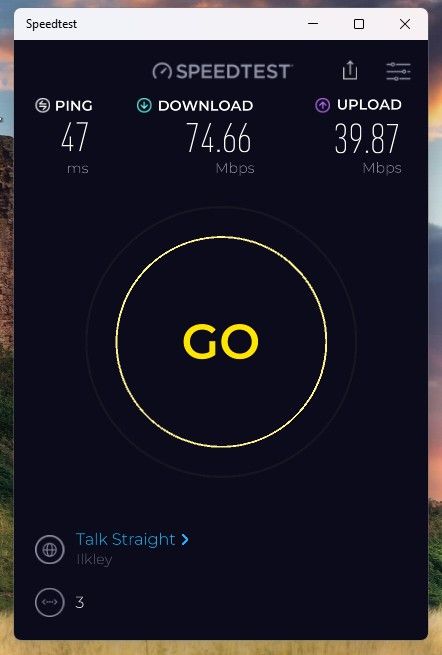 Today at 12:25 pm
 -
Hi,
Can you start a new post next time please so that we can help. When different topics are mixed into one post, it's harder for us to keep track to help.
Commercial speed testing is something most people don't usually fully understand.
When you use those commercial speed test services, they are highly optimized and on the edge of the ISP network, called CDN's (Content delivery networks).
You'll almost always get the very best speeds possible when using those. Those are only useful when you have severe speed issues and they can help confirm.
They are also highly optimized because they are using your browser. Browse based tests will always be faster than real world testing.Our test is more 'real world' in that it measures from source (your location) to destination (one of our locations) over the Internet rather than to an optimized local network. Our tests do not use browsers but raw TCP so the speed will always seem lower but it's the actual speed reached from one point to another over the Internet.
When you connect to anything over the Internet, you're going over many networks that may or may not limit throughput. Almost all networks will never allow you to use all of their bandwidth so have some sort of limiting controls that automatically slowly throttle speeds down so that there is plenty of bandwidth for others as well.
This is something you'll usually never notice when using a browser but it's very noticeable when you're downloading large files for example.It's just how the Internet works, it's shared.
Hope this helps.
-
Hi,
Can you start a new post next time please so that we can help. When different topics are mixed into one post, it's harder for us to keep track to help.
Commercial speed testing is something most people don't usually fully understand.
When you use those commercial speed test services, they are highly optimized and on the edge of the ISP network, called CDN's (Content delivery networks).
You'll almost always get the very best speeds possible when using those. Those are only useful when you have severe speed issues and they can help confirm.
They are also highly optimized because they are using your browser. Browse based tests will always be faster than real world testing.Our test is more 'real world' in that it measures from source (your location) to destination (one of our locations) over the Internet rather than to an optimized local network. Our tests do not use browsers but raw TCP so the speed will always seem lower but it's the actual speed reached from one point to another over the Internet.
When you connect to anything over the Internet, you're going over many networks that may or may not limit throughput. Almost all networks will never allow you to use all of their bandwidth so have some sort of limiting controls that automatically slowly throttle speeds down so that there is plenty of bandwidth for others as well.
This is something you'll usually never notice when using a browser but it's very noticeable when you're downloading large files for example.It's just how the Internet works, it's shared.
Hope this helps.
@ISPtracker_Support OK thanks
Hello! It looks like you're interested in this conversation, but you don't have an account yet.
Getting fed up of having to scroll through the same posts each visit? When you register for an account, you'll always come back to exactly where you were before, and choose to be notified of new replies (either via email, or push notification). You'll also be able to save bookmarks and upvote posts to show your appreciation to other community members.
With your input, this post could be even better 💗
Register Login