
Graphing results of continuous speed monitoring
-
I have my hardware agent installed (the fast unit) and connected directly to my Spectrum residential modem. My goal is to monitor my ISP speeds on a 24-hour basis and to track any "blips" or outages even when there are no devices connected.
Therefore, I'm looking for instructions on how to configure my agent and software to allow me to periodically log in and see what's been happening.
Thank you for any help!
Jeff -
Hi Jeff,
To configure your speed test, just go to your dashboard for the agent you want to use, click on Configure, then Speed test;
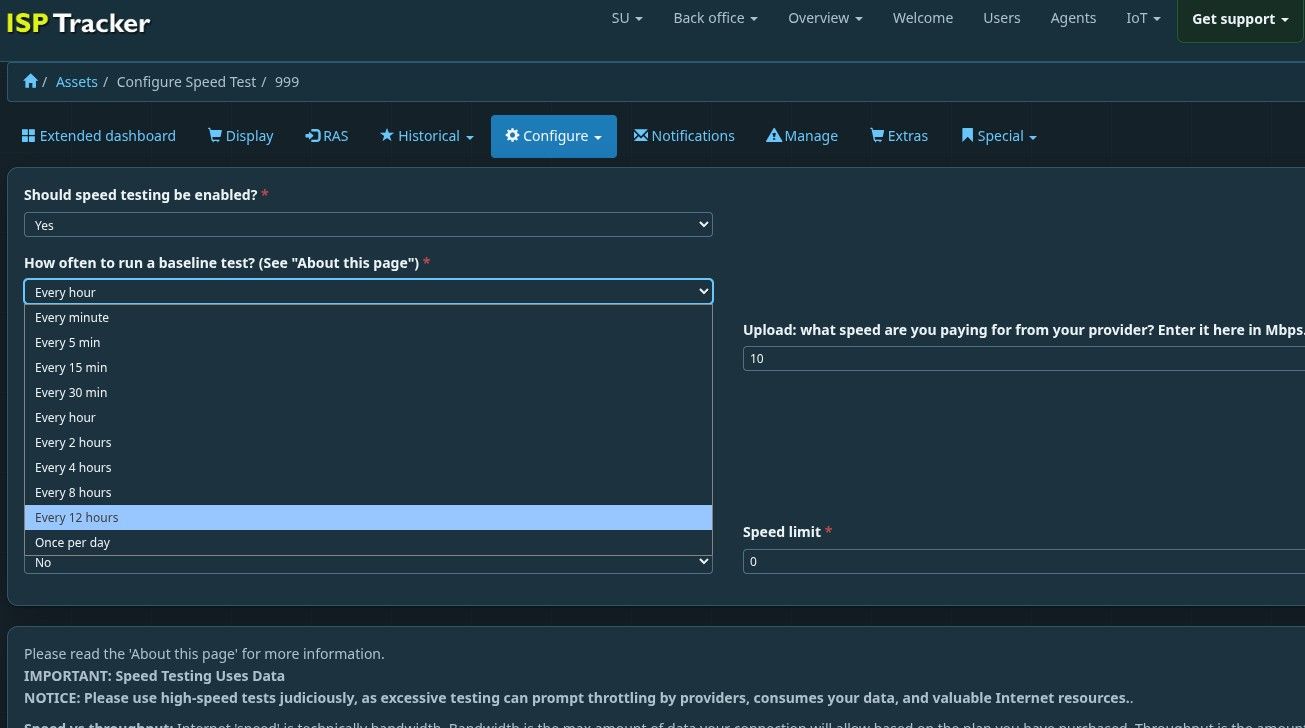
Set the how often section to what you want like 12hrs, 24hrs. If you want to run it more aggressively, just pick a shorter period but be sure to manually stop it in a day or two otherwise, you're just using up your own bandwidth testing it :).
As for checking to see what's happening, that is right in the agent dashboard, just scroll down to see the speed tests. Keep in mind, if your agent is new, it only started logging since you activated it so same thing with speed tests, it will take a bit of time to see how things are going.
If your agent is upgraded to Extended, you also have ISP Tracker Answers, which is sort of like your own AI in the dashboard of the selected agent. You simply ask questions. For example, you might ask, how has my Internet speed been over the last few days', once it's been running for a few days and it should respond in plain English. Even if it misses the question, just ask again in a more specific way and it will dig through that agents data to give you an answer.
Let us know if this helps please.
Hello! It looks like you're interested in this conversation, but you don't have an account yet.
Getting fed up of having to scroll through the same posts each visit? When you register for an account, you'll always come back to exactly where you were before, and choose to be notified of new replies (either via email, or push notification). You'll also be able to save bookmarks and upvote posts to show your appreciation to other community members.
With your input, this post could be even better 💗
Register Login