
Desktop Internet Monitoring Display. See Your Connection at a Glance
-
Desktop Internet Monitoring Display — See Your Connection at a Glance
We've been using these desktop Internet monitoring displays in our own offices and are considering making it available to ISP Tracker users. Here's an early look at what it does and why we've found it useful.
When your Internet connection slows down or drops, it can be hard to know where the problem starts. Is it your router, your local network, your Internet provider, or something farther away?
We're working on an ISP Tracker desktop Internet monitoring display designed to keep the state of your connection visible without requiring you to open an app, check a dashboard, or dig through technical results.
The compact seven-inch touchscreen Internet status display can sit on a desk, shelf, living-room table, network area, or anywhere else you want an always-visible view of your connection.
Its animated display follows the path from your home or office to your router, DNS servers, and Internet provider. Moving indicators and colors make it easy to notice when something slows down or stops responding. Response times and addresses are also available when you want more detail.
See what is happening with your Internet right now
The display continuously checks important parts of the connection and shows their current status.
If your router, DNS, or provider-facing connection stops responding or becomes unusually slow, the display changes as it happens. Instead of running a speed test or opening a monitoring dashboard just to see whether something looks wrong, the current state of the connection is already visible.
See what happened when you weren't watching
The desktop display and your ISP Tracker monitoring agent provide two different views of your Internet connection.
The display's local checks show what is happening right now.
Your ISP Tracker agent builds the history. It continues monitoring when you aren't watching, records interruptions and other changes, and provides the information ISP Tracker uses to explain what happened over time.
Together, they help answer two different questions:
What is happening with my Internet right now?
and
What happened while I wasn't watching?
That distinction can be especially useful with brief or intermittent Internet problems that disappear before you have time to investigate them.
Designed to stay visible
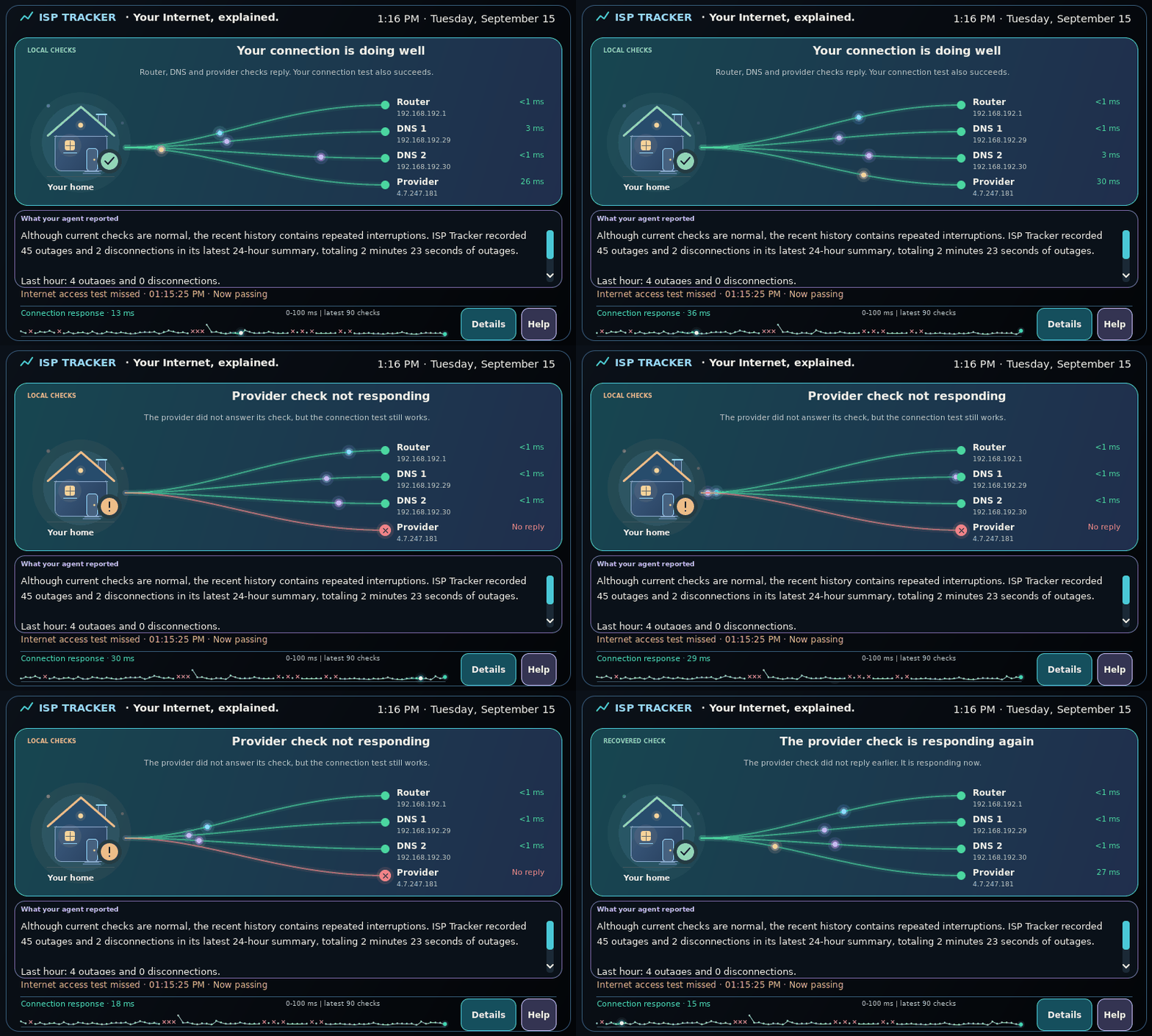
This isn't another monitoring page that has to remain open on your computer.
The touchscreen can sit where it is easy to see and can connect using Ethernet or Wi-Fi, so it doesn't have to live beside your router or computer.
You can use the touchscreen to open additional details and help, and adjust how the display looks in your room or workspace.
Whether it sits on a desktop in an office, a shelf at home, or a table in the living room, the idea is the same: keep the state of your Internet connection visible without having to go looking for it.
Internet monitoring without constantly watching a dashboard
Whether you want reassurance that everything is working or something visible when your Internet starts behaving strangely, the goal is simple:
Make the state of your Internet connection easier to see and understand.
We're considering making the desktop Internet monitoring display available to ISP Tracker users, but we'd like to know whether it's something people would actually find useful.
Would you use an Internet monitoring display like this in your home or office?
Tell us where you would use it, what you would want it to show, or what would make a dedicated Internet status display useful to you.
Hello! It looks like you're interested in this conversation, but you don't have an account yet.
Getting fed up of having to scroll through the same posts each visit? When you register for an account, you'll always come back to exactly where you were before, and choose to be notified of new replies (either via email, or push notification). You'll also be able to save bookmarks and upvote posts to show your appreciation to other community members.
With your input, this post could be even better 💗
Register Login