
New ISP Tracker Display
-
I guess I will start here. First, it may be useful to have a direct link from the new Tracker to a forum so we can see what other people are saying.
The problems I suffer from are usually packet loss, Jitter, and Speed.
I think it would be good to include scores like MOS, maybe VoIP, so we can see at a glance that everything is OK as usual, colour-coded.Having the agent and display in one unit is also a good idea
-
LOL, you are the first on the display topic.
The biggest problem we have is not getting enough input, feedback, on the things we build. In email, members tell us they love this, that but we need more input like this so that we can know what to focus our energies on.
I'm sure you've noticed that we've been extremely busy upgrading, making changes, trying to simplify the entire service and there is a huge improvement coming in the next few days.Also, the new look of this site, version 1, and we can see some things already need attention but it's much better than it was. Definitely need to make that side bar width smaller so we have more message space :).
I'll update the Local status board to include displays. We didn't want to have a new section for that because we don't know how many will ask questions about it. I'll move your topic there.
In terms of your input...
That makes sense, and I agree. A connection can technically be “up” but still be poor for real use if there is packet loss, jitter, or speed degradation.
This is documented in many posts and articles we've put on our blog.
We have experimented with packet loss and jitter before, and the challenge is that those measurements are only reliable when testing against a known target. We don't own the switches that packets travel on so cannot know if packets are being lost of being rate limited.
Also, random internet targets can block, rate-limit, or deprioritize probes, which can make the results misleading. So the best approach we had was to test against ISP Tracker-controlled test points.
We do like the idea of adding a simple quality scores, possibly including MOS-style or VoIP/video readiness indicators. Something color-coded like Good / Degraded / Poor would make it much easier to see at a glance whether the connection is healthy, not just online. In fact, if you look at the new display, it starts touching on these things. The display has it's own built in basic monitoring while the agent is doing the major work and reporting its findings back to the display, as if it was your dashboard summaries.
The problem is always the same. We can build things that run against our own resources but we cannot control anything in between so your agent would only know a some, not truly verifiable things.
Definitely on our radar and appreciate you suggesting it.
One small issue is that until everyone upgrade to the 2.1.4x version, it's difficult to put out new versions because the old method meant manually having to update while the new agents auto update themselves. For Linux users, so long as they use the new install script, they too get auto updates.
Hope this helps.
-
E EchoMin moved this topic from Feedback about ISP Tracker on
-
I like the idea. I would like a way to display this from multiple devices on a larger display.
Hi,
Are you talking about the desktop displays or the local status?
Local status is being removed soon, there are some issues we have to solve.If you mean being able to see multiple locations all at once, there is an overview map that should automatically get enabled for members that have 10 or more agents.
You can get more info here; https://www.isptracker.com/isp-network-monitoring-tools-overview-map/
That map is a browser page that can be opened on a large display. Then you would see all of your locations being monitored and their statuses in one place, on one large display. Since it's a web browser, you could also check different agents as needed.
It's basically like a NOC view if that makes sense for you.
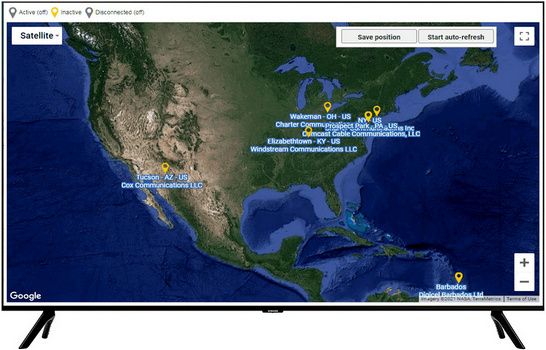
If I didn't understand, please feel free to add more context.BTW, as we work through the entire site, we will also be updating that overview map in the near future.



Hello! It looks like you're interested in this conversation, but you don't have an account yet.
Getting fed up of having to scroll through the same posts each visit? When you register for an account, you'll always come back to exactly where you were before, and choose to be notified of new replies (either via email, or push notification). You'll also be able to save bookmarks and upvote posts to show your appreciation to other community members.
With your input, this post could be even better 💗
Register Login