
HW agents: one Abandoned, one fried and needs to be replaced
-
I log into the app and am looking at my dashboard. The URL is https://app.isptracker.com/agent/manage. I choose "Order hardware agent." It brings me to the page https://www.isptracker.com/home-internet-connection-monitoring-hardware-agents/. I choose "Order your hardware agent." It brings me to the page https://www.isptracker.com/home-small-business-pricing/. I choose "Monthly." It brings me to the page https://app.isptracker.com/account/signUp. I select "Already have an account?" It brings me to the login page https://app.isptracker.com/account/login. I log into my account (even though I am already logged in) and it brings me back to the dashboard with URL https://app.isptracker.com/agent/manage. And now I am back at the beginning of the loop.
Is it possible to add a HW agent to an existing account, or do I have to set up a new account? Because this is maddening.
P.S. I cleared cookies and rebooted and can no longer re-create the 504 error so this doesn't seem to be a problem anymore. Now I just want to buy a new HW agent and get it added to my existing account. Please tell me there is a way to do this?
@jcorrigan said in HW agents: one Abandoned, one fried and needs to be replaced:
I choose "Monthly."
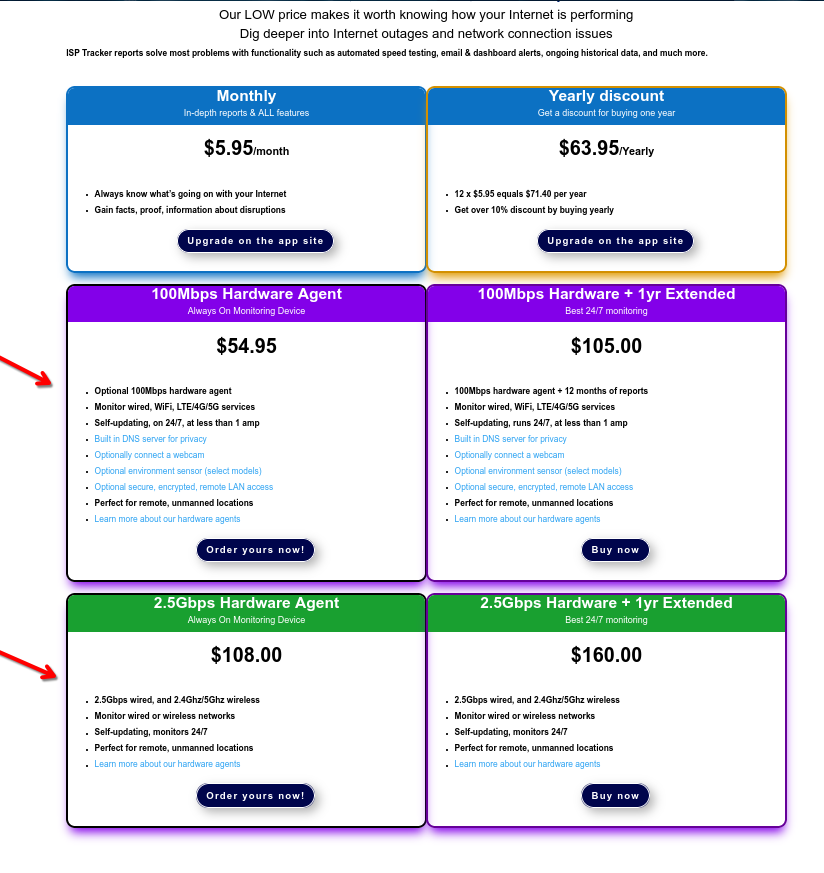
When you click on "monthly" you are choosing to pay a monthly fee for the extended report: that is NOT the option to buy a new HW agent.
That is the reason why you are "looping around" the pages
You have to look a little below
-
I have power cycled the device and connected it directly to the Verizon modem/router. Let me know if you can see it.
@jcorrigan said in HW agents: one Abandoned, one fried and needs to be replaced:
I have power cycled the device and connected it directly to the Verizon modem/router. Let me know if you can see it.
Nope
The agent is not seeing anything outside your network so far.
Can you confirm if it was able to get an IP address at least? -
I log into the app and am looking at my dashboard. The URL is https://app.isptracker.com/agent/manage. I choose "Order hardware agent." It brings me to the page https://www.isptracker.com/home-internet-connection-monitoring-hardware-agents/. I choose "Order your hardware agent." It brings me to the page https://www.isptracker.com/home-small-business-pricing/. I choose "Monthly." It brings me to the page https://app.isptracker.com/account/signUp. I select "Already have an account?" It brings me to the login page https://app.isptracker.com/account/login. I log into my account (even though I am already logged in) and it brings me back to the dashboard with URL https://app.isptracker.com/agent/manage. And now I am back at the beginning of the loop.
Is it possible to add a HW agent to an existing account, or do I have to set up a new account? Because this is maddening.
P.S. I cleared cookies and rebooted and can no longer re-create the 504 error so this doesn't seem to be a problem anymore. Now I just want to buy a new HW agent and get it added to my existing account. Please tell me there is a way to do this?
@jcorrigan
Is it possible to add a HW agent to an existing account, or do I have to set up a new account? Because this is maddening.The problem is you are not using the correct menu items. Yes, you can order another agent and add it into your existing account.
To upgrade an agent that you already have installed and running;
Go to 'Available packages' for the agent you want to upgrade. Then select 'Upgrade your reports now!' and follow the Paypal prompts.To purchase a hardware agent;
Got to 'Available packages' and click on the option 'HW agents + Extended reports packages' and that will take you to the www.isptracker.com site where you can order that.Or, go directly to the site and order from here;
https://www.isptracker.com/home-small-business-pricing/Once you've ordered, we manually create the agent and ship it. You'll receive an email with activation details. Simply log into your app.isptracker.com account at that point, get the hw agent up and running, then use the 'Activate hardware agent' option and follow the prompts to enter the two numbers that were sent in the email. That will instantly assign the new agent to your account.
Again, make sure the agent is up and running on your end before activating it.
Hope this helps. Let me know if you have any questions.
-
@jcorrigan said in HW agents: one Abandoned, one fried and needs to be replaced:
I have power cycled the device and connected it directly to the Verizon modem/router. Let me know if you can see it.
Nope
The agent is not seeing anything outside your network so far.
Can you confirm if it was able to get an IP address at least?I checked and the thing appears dead - no lights, no network traffic. I plugged it into other outlets I know are working and same thing. I restored it to the original configuration and it's still dead. And it does not appear on as a device on any of the network monitoring apps. So I don't know what happened but it seems like a brick. I can mail it in if that would help or just buy another one.
-
@jcorrigan
Is it possible to add a HW agent to an existing account, or do I have to set up a new account? Because this is maddening.The problem is you are not using the correct menu items. Yes, you can order another agent and add it into your existing account.
To upgrade an agent that you already have installed and running;
Go to 'Available packages' for the agent you want to upgrade. Then select 'Upgrade your reports now!' and follow the Paypal prompts.To purchase a hardware agent;
Got to 'Available packages' and click on the option 'HW agents + Extended reports packages' and that will take you to the www.isptracker.com site where you can order that.Or, go directly to the site and order from here;
https://www.isptracker.com/home-small-business-pricing/Once you've ordered, we manually create the agent and ship it. You'll receive an email with activation details. Simply log into your app.isptracker.com account at that point, get the hw agent up and running, then use the 'Activate hardware agent' option and follow the prompts to enter the two numbers that were sent in the email. That will instantly assign the new agent to your account.
Again, make sure the agent is up and running on your end before activating it.
Hope this helps. Let me know if you have any questions.
Thanks and I was able to purchase the HW agent.
-
I checked and the thing appears dead - no lights, no network traffic. I plugged it into other outlets I know are working and same thing. I restored it to the original configuration and it's still dead. And it does not appear on as a device on any of the network monitoring apps. So I don't know what happened but it seems like a brick. I can mail it in if that would help or just buy another one.
-
I checked and the thing appears dead - no lights, no network traffic. I plugged it into other outlets I know are working and same thing. I restored it to the original configuration and it's still dead. And it does not appear on as a device on any of the network monitoring apps. So I don't know what happened but it seems like a brick. I can mail it in if that would help or just buy another one.
@jcorrigan said in HW agents: one Abandoned, one fried and needs to be replaced:
I restored it to the original configuration and it's still dead
Can you please explain what you meant with that?
-
I checked and the thing appears dead - no lights, no network traffic. I plugged it into other outlets I know are working and same thing. I restored it to the original configuration and it's still dead. And it does not appear on as a device on any of the network monitoring apps. So I don't know what happened but it seems like a brick. I can mail it in if that would help or just buy another one.
@jcorrigan If you want to mail it in, at the very least, we could check it and confirm or see if it is actually working.
Mailing address is 697 6th St, suite 221, Prescott, Arizona. USA. 86301. Please be sure to send us the tracking number if you do send it so we can watch for it. We are curious also.
Just to be sure, it needs at minimum a 1amp USB power supply and there should not be anything connected to the USB port. I'm sure you adhere to these but just wanting to confirm for you.
And yes, I'd also like to know what you mean by you restored it? If you mean you used the reset button or something, it could be that it's been left in some unusual state from doing that.
-
@jcorrigan said in HW agents: one Abandoned, one fried and needs to be replaced:
I restored it to the original configuration and it's still dead
Can you please explain what you meant with that?
I meant I restored my network connections to the original configuration after you requested I plug the HW agent into a different device. This did not result in the HW agent working -- it's still dead. I did not (knowingly) modify anything on the HW agent itself.
-
@jcorrigan If you want to mail it in, at the very least, we could check it and confirm or see if it is actually working.
Mailing address is 697 6th St, suite 221, Prescott, Arizona. USA. 86301. Please be sure to send us the tracking number if you do send it so we can watch for it. We are curious also.
Just to be sure, it needs at minimum a 1amp USB power supply and there should not be anything connected to the USB port. I'm sure you adhere to these but just wanting to confirm for you.
And yes, I'd also like to know what you mean by you restored it? If you mean you used the reset button or something, it could be that it's been left in some unusual state from doing that.
I will mail it back and have you take a look.
-
I meant I restored my network connections to the original configuration after you requested I plug the HW agent into a different device. This did not result in the HW agent working -- it's still dead. I did not (knowingly) modify anything on the HW agent itself.
@jcorrigan Understood, thanks for the clarification.
-
BTW, your new agent was shipped yesterday I believe.
-
BTW, your new agent was shipped yesterday I believe.
I have received the two new agents and hooked them up and they appear to be working. I also shipped the non-functional one back.
-
Great to hear. Do you have tracking on the one you sent back so we don't miss it and know who sent what. Don't post tracking here, just send it as an email to support@isptracker.com please.
Thanks.
-
For some reason, we've never seen this agent get back to us. I think the shipper sent it back.
-
 I ISPtracker_Support marked this topic as a question on
-
I ISPtracker_Support has marked this topic as solved on

Hello! It looks like you're interested in this conversation, but you don't have an account yet.
Getting fed up of having to scroll through the same posts each visit? When you register for an account, you'll always come back to exactly where you were before, and choose to be notified of new replies (either via email, or push notification). You'll also be able to save bookmarks and upvote posts to show your appreciation to other community members.
With your input, this post could be even better 💗
Register Login