
Skip to content
  • Categories
  • Recent
  • Tags
  • Popular
  • Users
  • Groups
Skins
  • Light
  • Brite
  • Cerulean
  • Cosmo
  • Flatly
  • Journal
  • Litera
  • Lumen
  • Lux
  • Materia
  • Minty
  • Morph
  • Pulse
  • Sandstone
  • Simplex
  • Sketchy
  • Spacelab
  • United
  • Yeti
  • Zephyr
  • Dark
  • Cyborg
  • Darkly
  • Quartz
  • Slate
  • Solar
  • Superhero
  • Vapor

  • Default (No Skin)
  • No Skin
Collapse
Monitor your Internet service and provider

Information and Support

  1. Home
  2. Categories
  3. Support forums
  4. Windows
  5. Getting started
Notice: support.outagesio.com is now consolidated into support.isptracker.com

Automatically monitor your Internet service and provider with alerts to problems
Track Internet disconnections, provider outages with historical data, and automated speed testing.
For Windows, Linux, ARM64, ARMa7. Learn more by visiting www.isptracker.com

If you have an account on app.isptracker.com, use the same credentials to log in here!

Getting started

Scheduled Pinned Locked Moved Solved Windows
beginnerstartingoutagesno outage noted
2 Posts 2 Posters 652 Views 2 Watching
  • Oldest to Newest
  • Newest to Oldest
  • Most Votes
Reply
  • Reply as topic
Log in to reply
This topic has been deleted. Only users with topic management privileges can see it.
  • D Offline
    D Offline
    dberges
    wrote on last edited by
    #1

    I'm a rookie and can't seem to figure this out. I think i have an agent working, i'm getting PING chart, but everything else is blank and i know i've had outages. i really am just trying to find a way to track AlticeOne Optimum internet drops. They're short, but frequent (a couple times a day).
    Help?

    SBKS 1 Reply Last reply
    0
    • D dberges

      I'm a rookie and can't seem to figure this out. I think i have an agent working, i'm getting PING chart, but everything else is blank and i know i've had outages. i really am just trying to find a way to track AlticeOne Optimum internet drops. They're short, but frequent (a couple times a day).
      Help?

      SBKS Offline
      SBKS Offline
      SBK
      wrote on last edited by SBK
      #2

      @dberges

      Hi Dave,

      I see you were installing twice the agent on the same PC (ids 129143 and 129196) and then you installed on a new one (id 129201)

      I bet you are referring to the last one since the other one is not connected (software uninstalled or something else)

      This agent was created almost 10 hours ago but so far no IP outage has been recorded.

      Consider that the disconnections could also be unrelated to IP outages but I suggest to let it run for at least 48 hours before analyzing what is happening to the connection

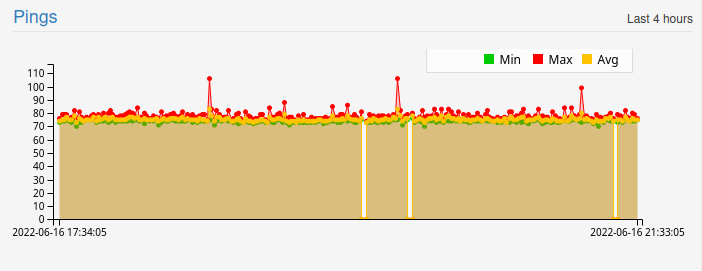
      Anyway just check the pings graph
      b22ca079-9164-4745-b6a2-8f6949c2fc88-image.png
      You can see that some info was missing from the agent even if no outage was recorded

      Ed (K.)
      Development Team

      1 Reply Last reply
      0
      • ISPtracker_SupportI ISPtracker_Support marked this topic as a question on
      • ISPtracker_SupportI ISPtracker_Support has marked this topic as solved on

      Hello! It looks like you're interested in this conversation, but you don't have an account yet.

      Getting fed up of having to scroll through the same posts each visit? When you register for an account, you'll always come back to exactly where you were before, and choose to be notified of new replies (either via email, or push notification). You'll also be able to save bookmarks and upvote posts to show your appreciation to other community members.

      With your input, this post could be even better 💗

      Register Login
      Reply
      • Reply as topic
      Log in to reply
      • Oldest to Newest
      • Newest to Oldest
      • Most Votes


      • Login

      • Don't have an account? Register

      • Login or register to search.
      • First post
        Last post
      0
      • Categories
      • Recent
      • Tags
      • Popular
      • Users
      • Groups
