
Agent notifying been inactive when it is not
-
Well it is what I am getting every night, and the email notification gets toggle off.
If I access the dashboar in the morning, the agent shows Active (green), so I do not know more, maybe you can please acces my agent (131365) information and find out more. Any way to stop email notifoactions to toggle to off? -
Yes, emails stop after three to prevent spamming about the same problems repeatedly. We imposed the limit to help prevent mail servers from blocking our notifications.
So if I understand, during the night, you get inactive notifications which means your agent is not able to contact our network at certain times perhaps. We'll take a look at your agent shortly.
You can always disable emails by going to Notifications and disabling the options you don't want. For example, if you don't want Inactive notifications, you can disable just those.
That said, the agent is telling you something important, that it is unable to reach the Internet now and then and it's not IP outages. This means something else, like a cable going bad or some other hardware, maybe the Ethernet port it's connected to etc. It could also be modem noise if the connection is cable/wireless, any number of things but it's telling you that there is something to look for.
The agent will always log all problems so that the owner can be given clues of where there might be a problem.
BTW, SMS is coming soon and folks can get all the notifications they want then.
Looking at your agent, the dashboard does show disconnections;
Inactive Not IP related, no details available
Disconnected Not IP related, no details available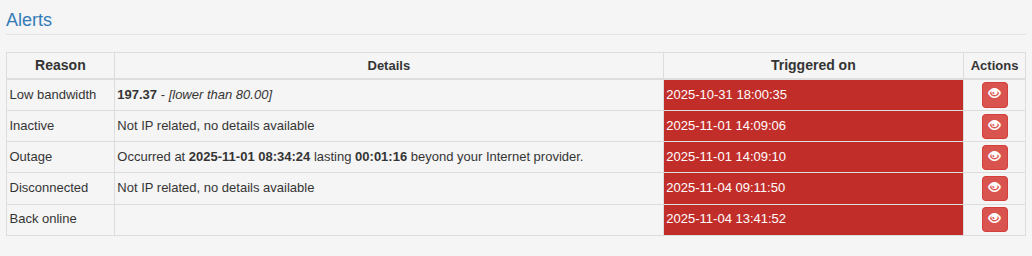
There are no details for these because they aren't IP outages, just disconnections.
That said, there are only four disconnections total. Disconnections are status 'Inactive' and 'Disconnected' IF you don't see IP outages for the same time.Does this help to better understand what you're seeing and how to control those emails?
-
Thanks for your response, and yes I am aware that emails stop to prevent spam after 3 emails, but I am getting only 1 email and gets toggle off, So thats not the eway it shold work no?
Regarding when Internet was down and the agent couldnt connect I see the following:
2025-11-07 11:18:40 - Down (157.238.227.205) for 1m 15s (Beyond)
2025-11-07 05:04:01 - Down (201.154.156.173) for 26s (Provider)
2025-11-07 05:03:40 - Down (201.154.156.173) for 10s (Provider)
2025-11-07 04:56:49 - Down (165.254.191.97) for 16s (Beyond)
2025-11-07 04:56:14 - Down (201.154.156.173) for 13s (Provider)
2025-11-07 00:43:00 - Down (201.154.156.173) for 11s (Provider)So it was down seconds, and only received 1 email at 5:05 AM when email gets toggle off, what about the previous disconections without any notifications, why email was toggle off when the 5:04:01 disconection only lasted 26 seconds?
At 11:18:40 has been down for 1m 15 sec and received the email just now -
Let me ask a developer to look at this because there might be a problem but I need him to confirm or not.
-
So I think I understand where the misunderstanding comes from...
We reset every 3 emails to avoid having problem with email spamming: some sites are TOO sensitive to a massive sending of emails to the same address.
I realize that the problem is in the subject of the email, like for instance "This is the LAST Inactive Notification", where one can interpret it as the last of other two "inactive notifications" and not the last because other two (not necessary inactive) were sent.
I think we should improve it...
-
OK, but I think something is not working as intended, for example, this are the Internet down times for early today:
2025-11-09 05:21:27 - Down (201.154.156.173) for 28s (Provider)
2025-11-09 05:21:06 - Down (201.154.156.173) for 11s (Provider)
2025-11-09 04:54:50 - Down (201.154.156.173) for 19s (Provider)
2025-11-09 04:47:27 - Down (201.154.156.173) for 11s (Provider)
2025-11-09 04:47:14 - Down (201.154.156.173) for 11s (Provider)
2025-11-09 04:31:15 - Down (201.154.156.173) for 16s (Provider)
2025-11-09 04:00:58 - Down (201.154.156.173) for 27s (Provider)The first one was at 4:00:58 in the morning for 27 seconds
And I received this email at 4:01:21:"Agent ID 131365 in time zone America/Mexico_City, installed at , Komchen running software version 1.85.2504.
This agent has become inactive, no longer communicating since 2025-11-09 04:01:21. This could be indicative of an outage or that the agent has been disabled or disconnected. If there is an outage in progress, details will be shown in your dashboard once the agent is able to send its report.
Notice, Cable Internet users
Cable provider based Internet services have an additional layer of potential problems as these services are provided using both signal levels and TCP/IP routing. This presents a problem in that ISP Tracker monitoring does not at this time monitor cable plant signal levels.
This is the LAST notification to avoid spam-like behaviors.
If you want to keep receiving email, please reset your Agent Notifications from the agent dashboard."And it says it is the last? When there was only one incident? And the email gets toggled off...
This is not behaving as intended.. -
Maybe I need to explain a bit more the general behavior of all this, so sorry for the long answer...
OUTAGES
You are going to receive the outage notification ONLY when the agent is back online, since the agent will send the report of how much the outage lasted and on which network (yours, provider, beyond), only AFTER it is online again.
INACTIVE
This is the reason why we also provide the "inactive notifications" since they are generated from our network when we see that the agent is no more communicating with our servers i.e. you will know that something is wrong long before the agent will be back online.
SMS
Please take note that we also added the SMS support in the "Available packages" in case you want to receive an SMS instead of an email.
ANTI SPAM POLICY
We have decided to send no more than 3 emails before the customer is informed to enable notifications again and this is because some sites have a quite restrictive policy about "possible spamming" and we definitely don't want to be identified as that, since we are giving you a service.
This means that you will receive a total of 3 emails and not up to 3 emails for each type of notification.Now let me analyze what you shared to see if there is something that is not behaving as intended.YESTERDAY'S OUTAGES
These are the recorded outages (you can see them all in the historical/outages option):
2025-11-09 04:00:58 With your Internet provide
2025-11-09 04:31:15 With your Internet provider
2025-11-09 04:47:14 With your Internet provider
2025-11-09 04:47:27 With your Internet provider
2025-11-09 04:54:50 With your Internet provider
2025-11-09 05:21:06 With your Internet provider
2025-11-09 05:21:27 With your Internet provider
2025-11-09 20:38:10 With your Internet provider
2025-11-09 20:44:01 With your Internet provider
2025-11-09 20:44:23 With your Internet provider
2025-11-09 21:02:20 On your local network
2025-11-09 21:10:54 With your Internet provider
2025-11-09 21:28:54 With your Internet provider
2025-11-09 21:29:18 With your Internet provider
2025-11-09 21:36:27 With your Internet providerEMAILS YOU RECEIVED
These are the emails you received:
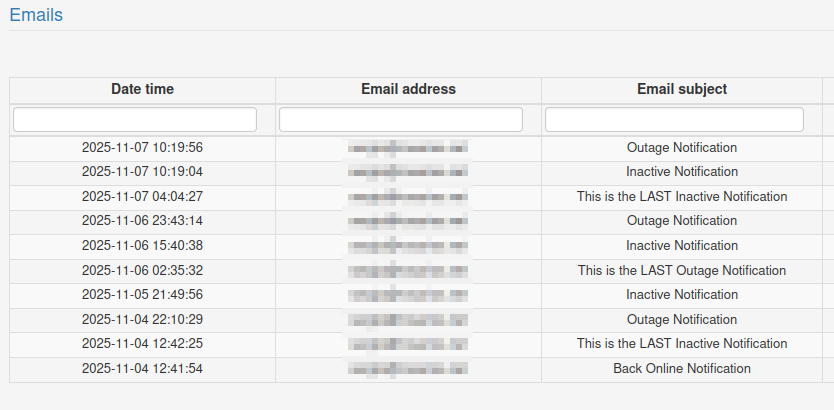
2025-11-09 04:01:36 This is the LAST Inactive Notification
2025-11-09 20:04:14 Inactive Notification
2025-11-09 20:38:13 Inactive Notification
2025-11-09 20:38:16 This is the LAST Outage NotificationCHANGES TO THE NOTIFICATIONS
And last but not least, these are the times where you were accessing the notifications:
2025-11-09 11:41:37
2025-11-09 14:18:35
2025-11-09 14:18:39
2025-11-09 14:18:42CHRONOLOGICALLY SORTED
2025-11-09 04:00:58 = OUTAGE - With your Internet provider
2025-11-09 04:01:36 = 3rd EMAIL - This is the LAST Inactive Notification
2025-11-09 04:31:15 = OUTAGE - With your Internet provider = no email was sent
2025-11-09 04:47:14 = OUTAGE - With your Internet provider = no email was sent
2025-11-09 04:47:27 = OUTAGE - With your Internet provider = no email was sent
2025-11-09 04:54:50 = OUTAGE - With your Internet provider = no email was sent
2025-11-09 05:21:06 = OUTAGE - With your Internet provider = no email was sent
2025-11-09 05:21:27 = OUTAGE - With your Internet provider = no email was sent
2025-11-09 11:41:37 = accessing notifications (probably enabling again)
2025-11-09 14:18:35 = accessing notifications (probably enabling again)
2025-11-09 14:18:39 = accessing notifications (probably enabling again)
2025-11-09 14:18:42 = accessing notifications (probably enabling again)
2025-11-09 20:04:14 = 1st EMAIL - Inactive Notification
2025-11-09 20:38:10 = OUTAGE - With your Internet provider = no email was sent
2025-11-09 20:38:13 = 2nd EMAIL - Inactive Notification
2025-11-09 20:38:16 = 3rd EMAIL - This is the LAST Outage Notification
2025-11-09 20:44:01 = OUTAGE - With your Internet provider = no email was sent
2025-11-09 20:44:23 = OUTAGE - With your Internet provider = no email was sent
2025-11-09 21:02:20 = OUTAGE - On your local network = no email was sent
2025-11-09 21:10:54 = OUTAGE - With your Internet provider = no email was sent
2025-11-09 21:28:54 = OUTAGE - With your Internet provider = no email was sent
2025-11-09 21:29:18 = OUTAGE - With your Internet provider = no email was sent
2025-11-09 21:36:27 = OUTAGE - With your Internet provider = no email was sentCONCLUSION
You are receiving a max of 3 emails no matter to which notification it is associated (Inactive, Disconnected, Back online, Outages, Low bandwidth, Sensor, Host monitoring) and then have to enable it again.
Until you enable it, events are recorded but the associated email is not sent.
I decided to change the text of the last email to avoid the misunderstanding that it was "the last email of that kind". -
Thanks but there is a problem with your chronology, the outages reported on the dashboard does not match in some cases, my comments between the chronolgy:
Per Dashboard
2025-11-09 04:00:58 = OUTAGE - With your Internet provider
2025-11-09 04:01:36 = 3rd EMAIL - This is the LAST Inactive Notification (which ones are the other 2? I do not see any on the 9th, on the 8th was internal, and then on the 7th?
Per Dashboard:
2025-11-09 20:44:23 - Down (201.154.156.173) for 10s (Provider)
2025-11-09 20:44:01 - Down (201.154.156.173) for 12s (Provider)
2025-11-09 20:38:10 - Down (201.154.156.173) for 5s (Provider)
There was no outage at 20:04:14? why I got an email?No I am only selecting to be notify by email when thera are:
Outages
Low bandwidthSo it should only stop sending emails after 3 of the above happen on the same day no?
-
This is the outage as it was recorded
2025-11-09 04:00:58 = OUTAGE - With your Internet provider
and this is the email that happens AFTER the agent is back online
2025-11-09 04:01:36 = 3rd EMAIL - This is the LAST Inactive NotificationAnd again the number of emails is referred to whichever combination of events that have to be notified.
And last you did change the notifications to have only OUtages and low bandwidth but before they were including also inactive
Is it clear now ?
-
To make another example based on the last change you made, if you have two events declaring a low bandwidth and one outage that is a total of 3 emails and until you enable it again no other email will be sent.
If between the time you were informed about the last email and the moment you enable it again a lot of other events are happening like inactives, outages, low bandwidth etc you will never be notified via email since the notification is off.
One thing is that the app is recording the different events and another thing is within the time frame the email notification is on you will receive the first 3 events that need to be notified depending on what you selected.
-
The point of the notifications is to let members know about problems, it's not about sending them endless notices about the same or similar problems.
The point is that the notifications, no matter how sent, how many etc, are to let you know there is something wrong with your Internet connection, either at home or with the provider.
Hope this helps.
-
And to remind why the logic is this way, it's because if the service blasts emails to many users on the same mail service, there is as good chance our mail services get blocked and then no one receives their notifications.
However, when using SMS (texting), we have no such limitations at this time.
-
Can this question be closed now? We have implemented SMS for everyone as a solution.
-
 I ISPtracker_Support marked this topic as a question on
-
I Icarus67 has marked this topic as solved on

Hello! It looks like you're interested in this conversation, but you don't have an account yet.
Getting fed up of having to scroll through the same posts each visit? When you register for an account, you'll always come back to exactly where you were before, and choose to be notified of new replies (either via email, or push notification). You'll also be able to save bookmarks and upvote posts to show your appreciation to other community members.
With your input, this post could be even better 💗
Register Login