
|
Notice: support.outagesio.com is now support.isptracker.com.
Use your app.isptracker.com credentials to log in here.
ISP Tracker monitors Internet disconnections, provider outages, and speed tests for Windows, Linux, ARM32/64. Learn more |
Introducing, built into all our agents, 'Local Status'
-
### Note: Read the end for help on using Local Status
This post is to introduce you to the new ISP Tracker Local Status feature that is now built into all of our agents. We have also introduced a single line installer and uninstaller for all Linux platforms that we support.
This forum category is for any questions you might have, and for feedback, good or bad, about Local Status so that we can continue improving this feature. Simply post your question.
Without your feedback, we cannot know what to focus on, so please take the time to let us know what you think. Suggestions are also very welcome.
So, what is ISP Tracker Local Status?
It is a new feature that gives everyone a basic local view of what is happening with their Internet connection. Your agent now includes additional monitoring that checks local connectivity to your router, your provider path, DNS, and ISP Tracker response.You'll find it at :8088
Your dashboard will show the local IP of your agent. Simply enter the following;
http://192.168.30.1:8088/ (example, use your own IP).It is not a replacement for the full reports that an Extended agent provides, but it does give you a quick way to see whether something looks wrong right now.
ISP Tracker Local Status gives an instant report so you can quickly tell if there is a problem impacting your Internet service.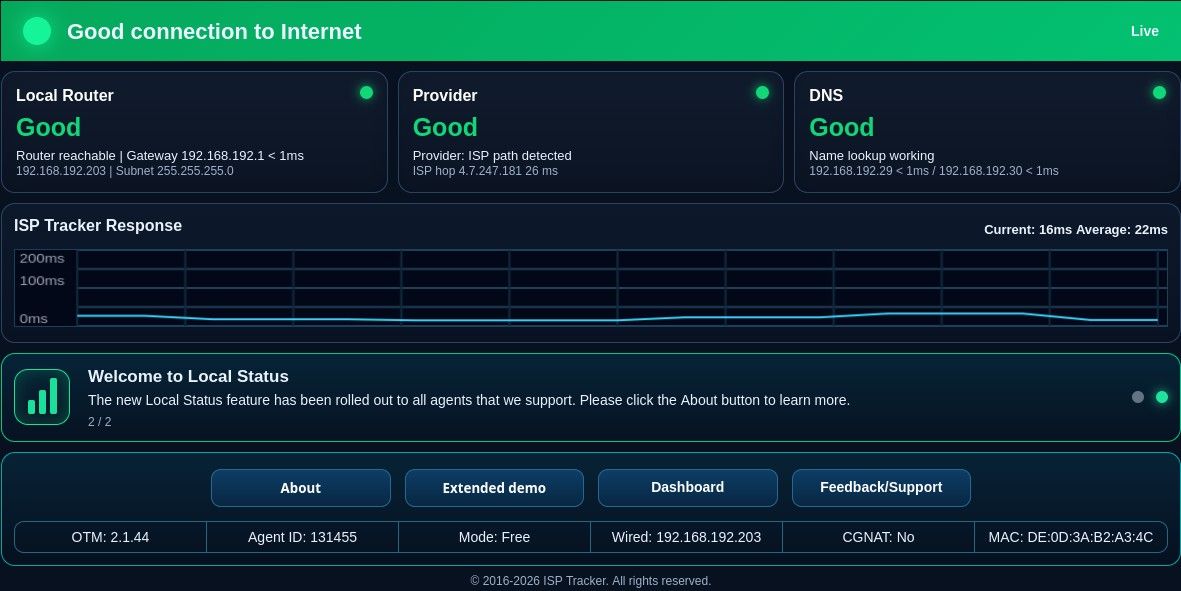
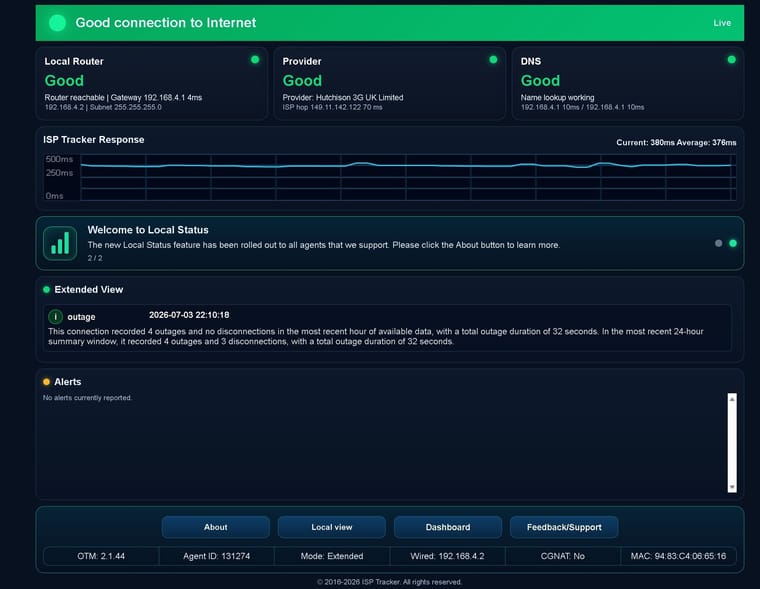
Non-Extended agents, shown in the image above, benefit from instant visual recognition of possible issues. Extended agents also receive summaries and alerts for issues. You do not even have to log into your dashboard if you prefer to use Local Status for a quick check.
How To Use ISP Tracker Local Status
Open Local Status from your agent. Depending on your device or installation, this may be available from the agent tray icon, local agent page, or device interface.Once it opens, you will see several status areas:
Local Router
This checks whether your device can reach your local router or gateway. If this shows a problem, the issue may be inside your home or local network, such as Wi-Fi, cabling, router, or LAN connectivity.Provider
This checks the path beyond your local router toward your Internet provider. This can help show whether the problem appears to be past your router and closer to your provider connection.
Some providers do not always respond to every test, and some networks change routes often. Local Status has been improved to better handle those situations, so a provider not responding directly does not always mean your Internet is down.DNS
This checks whether your current DNS servers appear to be responding. DNS is what allows names like websites and services to be found. If DNS is having trouble, your Internet may appear broken even when the connection itself is still working.ISP Tracker Response
This checks whether the agent can reach ISP Tracker. If this is failing while other items are working, the issue may be related to reaching our service rather than your local Internet connection.CGNAT Information
Local Status may also show CGNAT information. CGNAT is used by some providers and can affect how your connection is routed. CGNAT by itself does not always mean there is a problem, so it is shown as useful network information rather than as a main failure status.Messages, Summaries, And Alerts
Non-Extended agents can use Local Status for a quick current view.
Extended agents may also receive summaries and alerts, giving more detail about connection events over time. Local Status is meant to give you the immediate picture, while Extended reporting gives more history and deeper insight.When To Use It
Use ISP Tracker Local Status when:
Your Internet feels slow or unstable.
A website or service will not load.
You want to know if the issue looks local, DNS-related, provider-related, or related to reaching ISP Tracker.
You want a quick check without logging into the dashboard.
You are reporting a problem and want to share what Local Status is showing.We ask that you please take the time to give us feedback, good or bad, and especially if you find problems so that we can fix them quickly. We typically fix problems fast, but unless we are told about them, we may never know what needs to be fixed.
If you find this useful, have suggestions, ideas, or run into anything confusing, please feel free to share those right here in this post.
### Need help?
The following should help almost anyone having problems and if not, feel free to post for help.Having trouble opening ISP Tracker Live Status from another device?
ISP Tracker Live Status runs on the device where the ISP Tracker agent is installed. It normally opens at:
Locally: http://127.0.0.1:8088 or from another PC on the same network;
http://DEVICE-IP:8088Example:
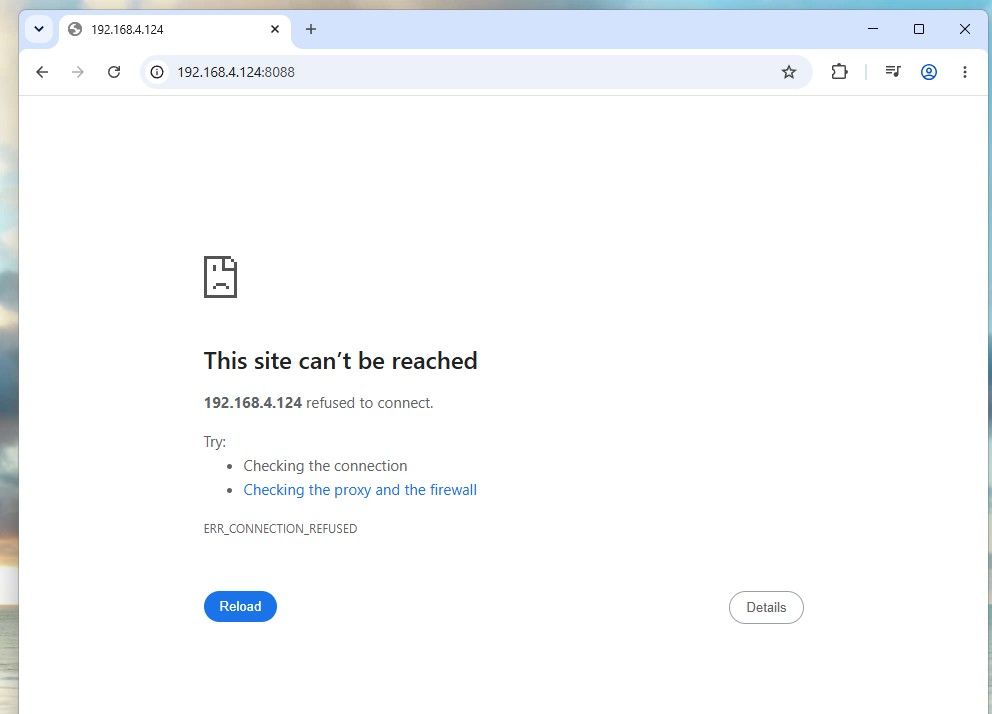
http://192.168.1.25:8088If it opens on the agent device but not from another device on your network, Windows may be blocking access to port 8088.
What to check
- Make sure you are using the correct IP address
On the Windows device running ISP Tracker:
- Open Command Prompt
- Type:
ipconfig
Look for the IPv4 Address on your active Ethernet or Wi-Fi adapter.
Then from another device on the same network, open:
- Make sure both devices are on the same network
The phone, laptop, or desktop you are using must be connected to the same local network as the ISP Tracker device.
Guest Wi-Fi networks may block access between devices.
- Allow Live Status through Windows Firewall
On the Windows device running ISP Tracker:
- Open PowerShell as Administrator
- Run this command:
New-NetFirewallRule -DisplayName "ISP Tracker Live Status 8088" -Direction Inbound -Action Allow -Protocol TCP -LocalPort 8088 -Profile Any -RemoteAddress LocalSubnet
This allows other devices on your local network to open the Live Status page.
- Try again
From another device on the same network, open:
Still not working?
Check for:
- Guest Wi-Fi isolation
- VPN software
- Third-party antivirus/firewall software
- The wrong IP address
- A different network or VLAN
Important note
This only allows access from your local network. It does not publish Live Status to the internet.
-
Hi,
What do you mean 'as usual'?
Can you tell us what changed that it works now?
Reasons for not being able to reach LS include;
-Windows Firewall blocking inbound 8088
-The network profile is Public
-The user is using the wrong LAN IP
-The browser machine is on a different VLAN/subnet
-Security software is blocking inbound local web servicesAny of these?

Hello! It looks like you're interested in this conversation, but you don't have an account yet.
Getting fed up of having to scroll through the same posts each visit? When you register for an account, you'll always come back to exactly where you were before, and choose to be notified of new replies (either via email, or push notification). You'll also be able to save bookmarks and upvote posts to show your appreciation to other community members.
With your input, this post could be even better 💗
Register Login