
Remote Access Service or RAS
-
Remote Access Service (RAS)
RAS is available on most ISP Tracker hardware agents and adds remote access to the networks you’re already monitoring. In addition to tracking Internet performance, you can securely reach devices on the LAN where the agent is installed.
This means you can access routers, firewalls, cameras, and other systems without opening ports on the main router. No open ports means there’s nothing exposed for someone scanning your network from the outside.
Access is handled through the dashboard. Once configured, links appear in the Links section, and your settings are shown under Remote Controls.
Getting Started
To use RAS, create at least one profile and click Connect. That enables access when you need it.
Profiles let you define how to reach each device on your network. Once set up, accessing them is just a single click from the dashboard.
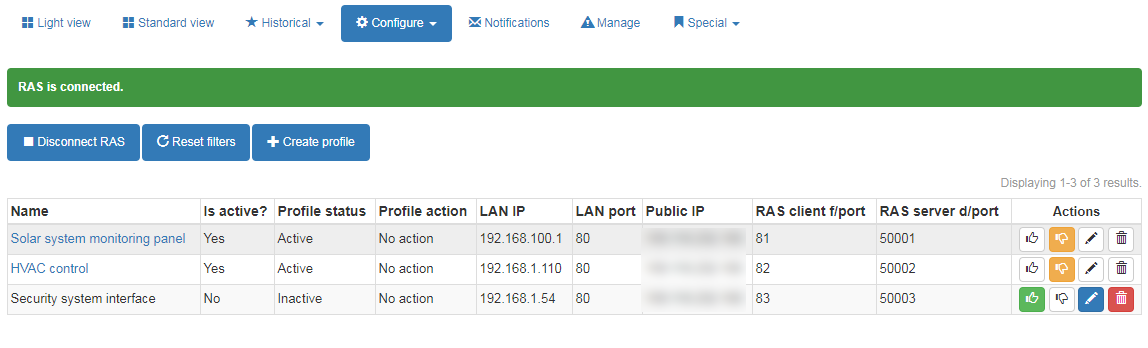
Profile Settings
- Name – A label to identify the device (e.g. “Security system”)
- LAN IP – The internal IP address of the device
- LAN Port – The port used by the device
- Public IP – Optional: restrict access to a specific external IP
Some devices, especially those using port 443, may require a bit of trial and error. In certain cases, using port 80 may still allow access while maintaining a secure connection.
Using RAS
Once a profile is created and RAS is connected, links will appear in the dashboard for quick access. Additional profiles are available from the RAS configuration page.
When you’re done, click Disconnect to turn off access until you need it again.
What It’s Useful For
RAS is ideal for quick access and recovery situations — whether you need to check a device, make a change, or regain access to a network after a firewall or router has been misconfigured.
-
E EchoMin locked this topic on
-
K KelAuth referenced this topic on
Hello! It looks like you're interested in this conversation, but you don't have an account yet.
Getting fed up of having to scroll through the same posts each visit? When you register for an account, you'll always come back to exactly where you were before, and choose to be notified of new replies (either via email, or push notification). You'll also be able to save bookmarks and upvote posts to show your appreciation to other community members.
With your input, this post could be even better 💗
Register Login